FREE TEMPLATES
Best Meeting Notes Template
Use this free, editable Meeting Notes Template to capture key discussions, decisions, action items, and follow-ups in one organized document. Whether you're documenting a team meeting, client call, project discussion, or remote meeting, this template helps you keep important information clear, accessible, and easy to review.


What Is a Meeting Notes Template?
A Meeting Notes Template is a structured document for recording the important information discussed during a meeting. It provides a consistent format for capturing meeting details, discussion points, decisions, action items, responsibilities, and follow-ups so everyone can refer back to the same information.
Benefits of Using a Meeting Notes Template
- Stay organized: Keep important meeting information structured and easy to find.
- Improve accountability: Clearly record action items, owners, and deadlines.
- Capture decisions: Document key decisions so there is a shared record of what was agreed upon.
- Support collaboration: Give participants a common reference after the meeting.
- Save time: Use a ready-made structure instead of creating meeting notes from scratch.

What Should a Meeting Notes Template Include?
A useful meeting notes template should capture the information participants need to understand what happened during the meeting and what needs to happen next.
Key Elements of a Meeting Notes Template:
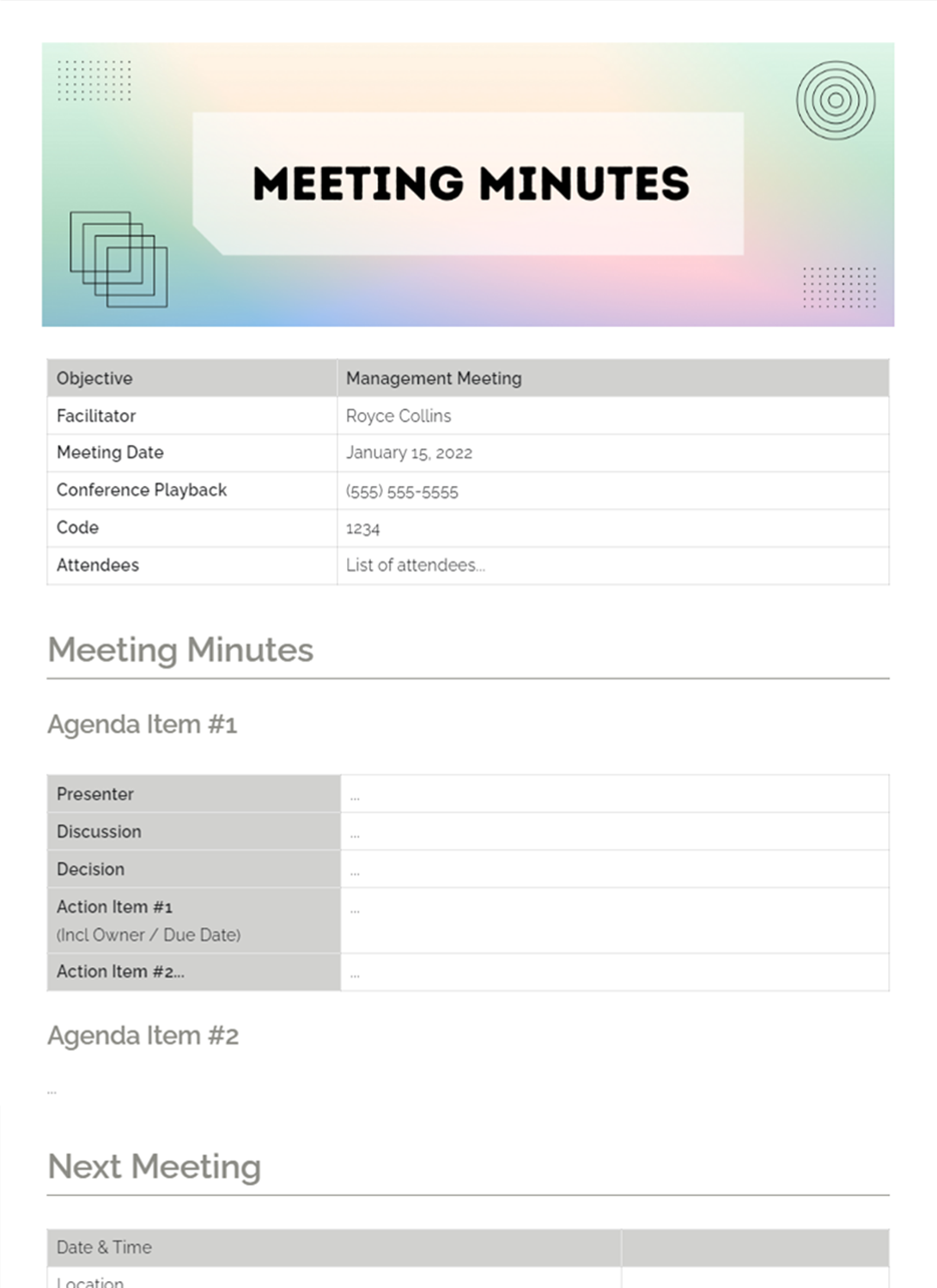
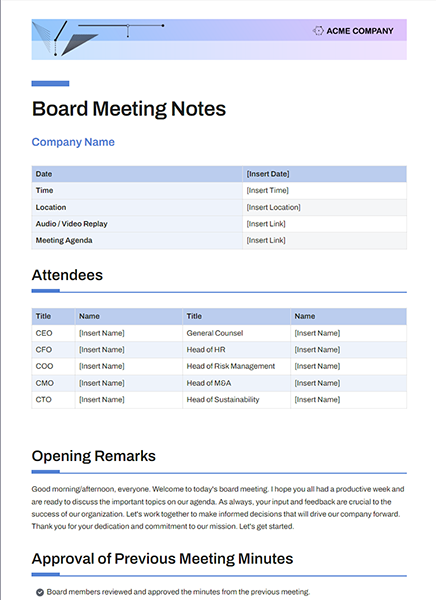
- Meeting Details: Date, time, purpose, facilitator, and meeting type.
- Attendees: Names and roles of participants.
- Discussion Points: Important topics, ideas, questions, and updates discussed.
- Decisions: Key decisions and agreements reached during the meeting.
- Action Items: Tasks that need to be completed after the meeting.
- Owners and Deadlines: People responsible for each action item and its due date.
- Summary and Follow-Ups: Key takeaways, next steps, and topics requiring further discussion.
- Next Meeting: Date or details for the next meeting, when applicable.
How to Use This Meeting Notes Template
Use the template during the meeting to capture important information as the discussion progresses.
Steps to Use a Meeting Notes Template:
Step 1: Add the Meeting Details
Record the meeting date, purpose, facilitator, and other basic information.
Step 2: List the Participants
Add the names and roles of everyone attending the meeting.
Step 3: Capture Key Discussions
Record the main points, questions, ideas, updates, and issues discussed. Focus on information that participants may need to reference later.
Step 4: Document Decisions
Note important decisions, agreements, and conclusions reached during the meeting.
Step 5: Record Action Items
List follow-up tasks along with the person responsible and the expected deadline.
Step 6: Add a Summary and Follow-Ups
Summarize the main takeaways and identify any topics or actions that need to be addressed after the meeting.
What's Included in This Meeting Notes Template?
This customizable template provides a simple structure for documenting meetings, including:
- Meeting purpose and details
- Attendee information
- Discussion notes
- Decisions and agreements
- Action items and task owners
- Deadlines and follow-up information
- Meeting summary and key takeaways
- Next meeting details
Who Can Use This Meeting Notes Template?
This template can be useful for:
- Project managers documenting project discussions and follow-ups.
- Team leads keeping teams aligned on decisions and responsibilities.
- Business analysts recording requirements, decisions, and action items.
- HR professionals documenting team and employee-related meetings.
- Department heads maintaining records of important discussions.
- Product teams tracking product decisions, issues, and next steps.
- Anyone responsible for taking meeting notes who wants a consistent and organized format.
Want to create meeting notes faster? Use the AI Meeting Notes Summarizer to turn meeting details into organized notes.
FAQs
Q1. How do you take effective meeting notes?
Focus on the meeting's key discussions, decisions, action items, owners, and deadlines. Avoid trying to capture every word and prioritize information that participants will need later.
Q2. What should meeting notes include?
Meeting notes typically include meeting details, attendees, discussion points, decisions, action items, responsible people, deadlines, and follow-up information.
Q3. What is the difference between meeting notes and meeting minutes?
Meeting notes can be informal and focus on capturing useful information during a meeting. Meeting minutes are typically a more formal record of the meeting, including official decisions and proceedings.
Q4. Who should take meeting notes?
A designated note-taker, meeting organizer, or another participant can take notes. Assigning this responsibility in advance helps ensure important information is captured consistently.
Q5. Can I use this template for virtual meetings?
Yes. The template works for in-person, remote, and hybrid meetings and can be adapted to different types of team, client, or project discussions.