FREE TEMPLATES
Best eBook Template
Use this free, customizable eBook Template to organize your content, save time, and collaborate better—all in one place. Whether you’re writing a how-to guide, a research-backed report, or a story-driven resource, this template gives you the structure you need to turn ideas into a polished, professional eBook.


What is an eBook Template?
An eBook template is a pre-designed structure that assists authors, marketers, and educators with the design and writing of eBooks as efficiently as possible. It helps organize your content into sections that are repeatable, such as the introduction, chapters, case studies, conclusions, and more. This way, you can use higher-order thinking to focus on the quality of your writing rather than the layout and presentation of your information.
Benefits of Using an eBook Template
- It saves time by providing a ready-made structure for writing and design.
- It keeps your content clear, organized, and easy to read.
- It allows for flexibility—you can easily switch out a section to suit your design.
- It makes your eBook look neat and professional.
- It enables team collaboration by providing a standard format for teams to work from.
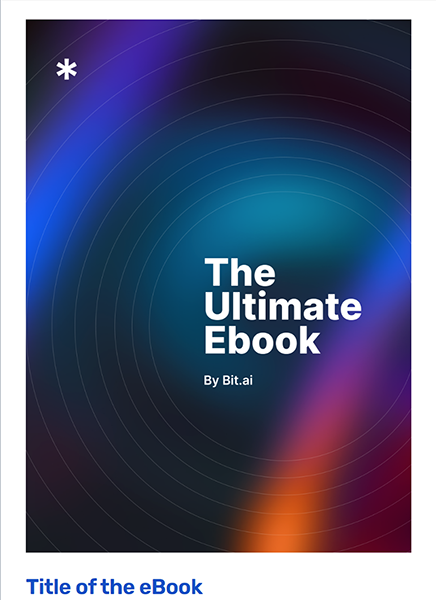
What should be included in the eBook Template?
A strong eBook template should balance structure with flexibility. It should give you clear guidelines on what to include, while still leaving room for customization based on your audience, topic, and goals.
Key Elements of the eBook Template
- Title and Author Description: The book title, subtitle, and author/publisher credits.
- Introduction: A brief opportunity to engage readers and indicate the knowledge/s they will gain.
- Chapters: Grouped sections for background, key concepts, examples and in-depth explanations.
- Action Steps: A means of translating knowledge into practical, actionable advice.
- Challenges & Solutions: Space to address common obstacles readers may face.
- Expert Insights: Quotes, research, or interviews to build authority.
- Conclusion: A strong closing that reinforces your key message.
- Appendices & References: Supporting data, sources, or additional materials.
- About the Author: A closing section to add credibility and connect with readers.
How to use this eBook Template
It is easy to use this template: it gives you a straightforward framework you can fill in piece by piece, step by step. Using the framework ensures your eBook is organized, engages readers, and creates meaningful takeaways.
Steps to Use the eBook Template
Step 1: Start with the header section—add your book title, author details, and optional subtitle.
Step 2: Write a compelling introduction that outlines your purpose and sets expectations.
Step 3: Break your content into chapters, adding background, key concepts, and case studies.
Step 4: Include actionable steps so readers can apply your insights immediately.
Step 5: Add expert insights, research, or data to strengthen credibility.
Step 6: Conclude with a summary that highlights the essential learning.
Step 7: Finish with the appendices, references and an “About the Author” section for a professional touch.
What’s Inside This eBook Template
This eBook template has been created to provide a balance between readability, structure and flexibility that will ensure you don’t forget key ingredients, but, at the same time, give you enough flexibility to adapt content to your style.
This Customizable eBook Template Layout Includes
- Title Page: Title, author, and optional subtitle.
- Publishers details (optional): Information to use in reference to distributing or publishing.
- Introduction: Give a brief introduction to garner your reader's interest.
- Chapter 1: Support, definitions, and case examples.
- Chapter 2: More details and next steps.
- Chapter 3: Issues, resolutions, and comments by an expert.
- Conclusion: Recap and a call to action.
- Appendices: Supporting details related to text, charts, or graphs.
- References: Respect your sources and add creditability.
- Author Information: Author background and expertise.
Why You Need an eBook Template
An eBook template is necessary because it alleviates any intimidation of a blank slate. It offers pre-arranged organization, consistency, and allows you to follow an intended order in your writing. This will enable you to concentrate on writing a higher quality eBook while relying on a template format and organization. Templates also save you time and reduce errors so that you can produce a quality product.
How to Fill Out an eBook Template
To properly complete the template, start by adding your book's title and author if appropriate. Then write a solid introduction to set out the purpose of your eBook. Determine the breakdown of your ideas into chapters. Then provide some background, ideas, and examples for each chapter. Action steps can be added for practical application and solutions orientation in your eBook. Finally, finish with the conclusion, references, and author bio so the finished product comes together appropriately.
Who can use this eBook Template
This template works well for:
- Authors looking to streamline the writing process.
- Marketers creating lead magnets or thought leadership content.
- Educators building structured learning resources.
- Businesses producing professional guides, reports, or handbooks.
FAQs
Q.1 How do I use this eBook template?
Open the template, replace placeholder text with your own content, and customize sections to match your topic.
Q.2 Can I add or remove sections in the template?
Yes, the template is fully customizable—you can expand chapters, adjust layouts, or remove sections as needed.
Q.3 What makes this eBook template effective?
Its structure saves you time, ensures clarity, and provides a professional layout ready for publishing.
Q.4 Who benefits most from using this template?
Writers, marketers, educators, and professionals who want to create organized and engaging eBooks.