AI Reflection to Action Generator
Transform Insights Into Concrete Steps with Ease
Great ideas often begin with reflection - after a team meeting, a personal journaling session, or a feedback discussion. But without a clear way to turn those insights into action, valuable lessons can easily be forgotten.
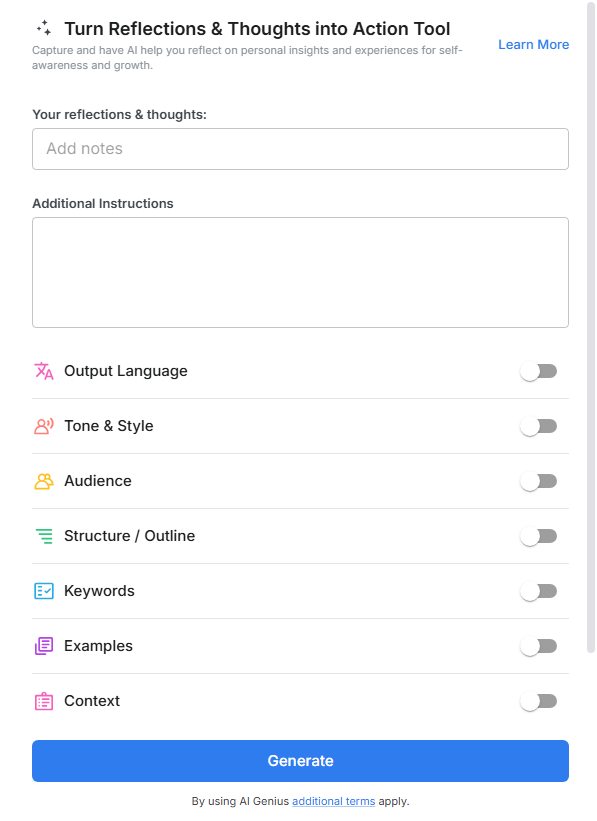
That’s where Bit.ai’s Turn Reflections & Thoughts Into Action Tool comes in! It helps you organize your thoughts, identify key learnings, and turn them into practical next steps. Whether you’re working on personal growth, improving team performance, or reviewing a project, you can move from reflection to action with greater clarity.
Let’s explore how this tool works and how you can use it to turn insights into meaningful progress.
What Is a Turn Reflections & Thoughts Into Action Tool?
A Turn Reflections & Thoughts Into Action Tool helps you convert thoughts, feedback, and lessons learned into structured action items. Instead of leaving reflections as unorganized notes, you can identify what matters, decide what needs to change, and outline the next steps.
You can use it to reflect on completed projects, capture takeaways from meetings, respond to performance feedback, or set personal development goals. The result is a more organized approach to turning what you learn into what you do next.
Key Elements of an Effective Reflection-to-Action Plan
A useful action plan connects what you have learned with what you intend to do next. Include these elements to make your reflections more actionable:
- Key Reflection: Summarize the experience, feedback, or observation that prompted the reflection.
- Main Insights: Identify the most important lessons, patterns, or areas for improvement.
- Desired Outcome: Define what you want to change, improve, or achieve.
- Specific Action Items: Break each insight into clear steps that can be completed.
- Priorities: Identify which actions matter most and which can wait.
- Owners and Deadlines: Assign responsibility and realistic target dates when working with a team.
- Success Measures: Decide how you will recognize progress or determine whether an action has worked.
- Follow-Up Review: Set a time to revisit the plan, assess results, and identify any adjustments needed.
Why Use a Turn Reflections & Thoughts Into Action Tool?
Turning reflections into action takes more than recording what happened. You need to identify useful insights and determine how to apply them. This tool can help you:
- Capture Key Insights: Organize takeaways from meetings, retrospectives, journaling, and feedback sessions in one place.
- Turn Thoughts Into Tasks: Convert broad ideas and observations into specific, manageable next steps.
- Improve Clarity and Focus: Identify priorities and define what needs attention instead of feeling overwhelmed by scattered thoughts.
- Support Accountability: Add owners, deadlines, and progress updates to help keep action items moving forward.
- Encourage Continuous Improvement: Use lessons from previous experiences to make better decisions and improve future outcomes.
- Strengthen Team Alignment: Share reflections and agreed-upon next steps so everyone understands what needs to happen next.
- Support Personal Growth: Translate self-reflection into achievable goals and practical development activities.
Why Use Bit.ai’s Turn Reflections & Thoughts Into Action Tool?
Bit.ai provides a collaborative workspace where you can turn reflections into organized, shareable documents. Its AI writing assistant can help structure your input into clearer action items, which you can then review and refine.
Here’s how Bit.ai can support your reflection-to-action process:
- AI-Assisted Organization: Turn your notes and observations into structured summaries, action items, or step-by-step plans.
- Flexible Documents: Organize reflections, decisions, priorities, and follow-up tasks in a document that suits your needs.
- Collaborative Workspaces: Share documents with colleagues or collaborators to discuss insights and agree on next steps.
- Centralized Knowledge: Keep reflection notes, action plans, and progress updates together for easier reference.
- Checklists and Tables: Structure tasks, responsibilities, and updates in a format that makes your next steps easier to follow.
- Connected Documentation: Link related project documents, meeting notes, and goals to provide context for your action plan.
How to Use Bit.ai’s Turn Reflections & Thoughts Into Action Tool
1. Open a new document in Bit.ai.

2. Type @ on a blank line to open the AI Writing Assistant.

3. Search for "Turn Reflections & Thoughts Into Action Tool" in the left sidebar.
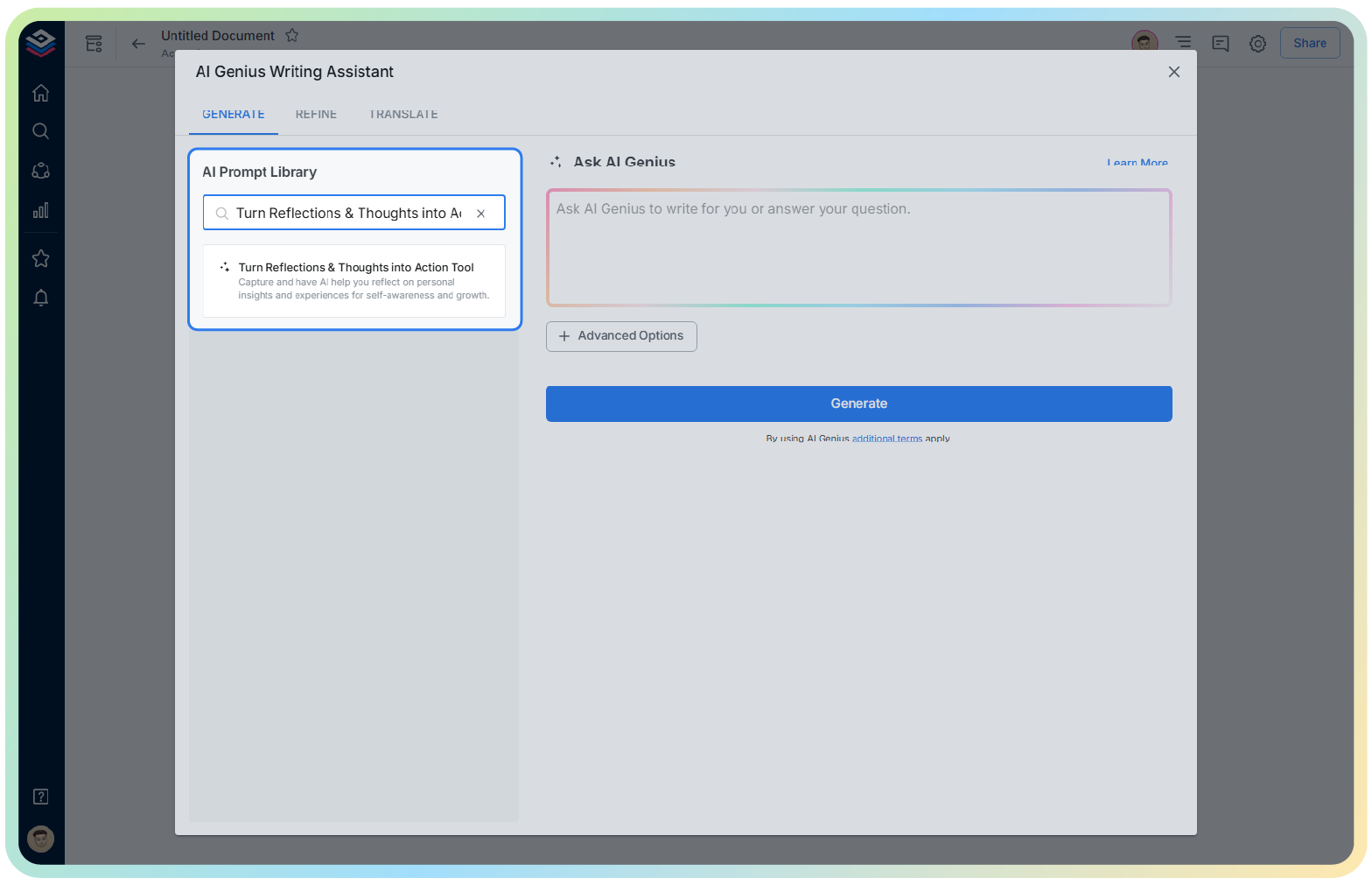
4. Add your notes, observations, feedback, or key learnings. Include relevant context and any outcomes you want to achieve.

5. Use the "Available Options" to generate action items or a plan. Review the output, correct any inaccuracies, and adjust the steps to match your situation.

6. Click "Insert" to add the generated content to your Bit document. Add owners, deadlines, checklists, or progress updates where needed.

Use Cases for the Turn Reflections Into Action Tool
You can use this tool in a variety of personal and professional situations:
- Post-Meeting Reflection: Capture important takeaways from team meetings or one-on-ones and turn them into follow-up tasks.
- Personal Journaling: Identify recurring thoughts, lessons, and priorities from journal entries and translate them into achievable goals.
- Project Retrospectives: Document what worked, what didn’t, and what the team should change in future projects.
- Coaching and Mentorship: Turn discussion points and feedback into development goals and follow-up activities.
- Employee Development: Organize performance feedback into practical learning objectives and improvement steps.
- Leadership Reflection: Convert business observations and strategic lessons into priorities for teams or upcoming initiatives.
- Learning and Skill Development: Turn lessons from courses, training sessions, or reading into activities that reinforce learning.
Wrapping Up
Reflections become more valuable when they lead to meaningful action. Bit.ai’s Turn Reflections & Thoughts Into Action Tool helps you organize your thoughts, identify important lessons, and develop practical next steps for personal growth, team improvement, and project planning.
By turning insights into clear action items and revisiting them over time, you can build a more consistent approach to learning, improving, and moving toward your goals.
Turn Reflections Into Action FAQs
1. Can I use this tool for personal journaling?
Yes. You can use personal reflections and journal notes to identify lessons, clarify priorities, and create practical next steps for personal development.
2. How do I track the progress of my action items?
You can add checklists, tables, deadlines, and progress updates to your Bit.ai document. Review the plan regularly and update completed or outstanding tasks.
3. Can I collaborate on reflection documents with others?
Yes. You can share documents with teammates or collaborators so you can review feedback, discuss insights, and coordinate next steps.
4. What types of reflections can I turn into action plans?
You can work with project retrospectives, meeting notes, performance feedback, coaching sessions, personal journal entries, and learning notes. The usefulness of the resulting plan depends on the context you provide.
5. How do I make sure the generated action items are useful?
Review each action for clarity, relevance, and feasibility. Add missing context, set realistic deadlines, and assign responsibilities where appropriate before acting on the plan.
6. Can this tool help with team retrospectives?
Yes. You can use it to organize lessons learned, identify improvement opportunities, and turn team discussions into follow-up actions for future projects.