


AI Employee Evaluation Form Generator
Track Progress. Promote Growth. Empower Performance.
Employee evaluations can be valuable opportunities to recognize achievements, discuss challenges, and plan professional growth. But without a clear structure, performance reviews can become inconsistent, time-consuming, or difficult for managers and employees to navigate.
Bit.ai’s Employee Evaluation Form Generator helps you create structured performance evaluation forms tailored to different roles, responsibilities, and review objectives. You can organize evaluation criteria, feedback questions, and development goals in one document, giving managers a practical starting point for more focused performance conversations.
Whether you’re preparing annual reviews, conducting quarterly check-ins, or gathering employee self-assessments, Bit.ai helps simplify the process of creating evaluation forms.
Let’s explore how this tool works and how you can use it to support employee development.
What Is an Employee Evaluation Form Generator?
An Employee Evaluation Form Generator is an AI-powered tool that helps you draft structured forms for assessing employee performance. It can help organize criteria related to job responsibilities, communication, teamwork, goal achievement, and professional development.
Rather than starting from a blank page, you can provide details about the role, review period, and purpose of the evaluation. The generated draft can then be customized to reflect your organization's performance expectations and review process.
A well-designed evaluation form gives managers a consistent framework for recording observations, sharing constructive feedback, recognizing strengths, and identifying areas for improvement.
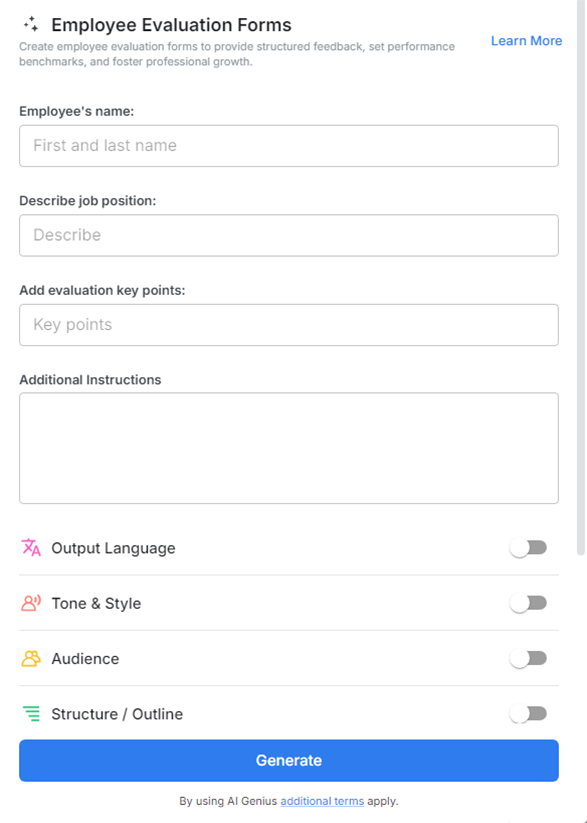
Key Elements of an Effective Employee Evaluation Form
A useful evaluation form should reflect the employee's role and provide enough structure for specific, constructive feedback. Consider including these elements:
- Employee and Review Details: Record the employee's role, department, reviewer, and evaluation period.
- Role-Specific Criteria: Include competencies and responsibilities that are relevant to the employee's actual work.
- Goals and Achievements: Assess progress against agreed objectives and document meaningful contributions.
- Performance Ratings: If using a rating scale, define what each score means and apply the scale consistently.
- Strengths and Contributions: Provide space to recognize effective work, positive behaviors, and demonstrated skills.
- Areas for Improvement: Identify specific challenges or skills that require further development, supported by relevant examples.
- Employee Comments: Allow employees to share their perspective, accomplishments, challenges, and feedback.
- Development Goals: Document realistic next steps, training needs, and professional growth objectives.
- Follow-Up Actions: Include agreed responsibilities, target dates, and a plan to review progress where appropriate.
Why Use an Employee Evaluation Form Generator?
A clear evaluation form helps make performance discussions more focused and productive. It provides a shared framework for reviewing progress and identifying meaningful next steps.
- Clarify Performance Expectations: Define the responsibilities, competencies, and outcomes employees are expected to demonstrate.
- Recognize Achievements: Document contributions, completed goals, and areas where employees have performed well.
- Identify Growth Opportunities: Highlight skills to develop, challenges to address, and opportunities for further learning.
- Encourage Consistent Reviews: Use a common structure across review cycles while adapting criteria to individual roles.
- Support Goal Setting: Turn evaluation findings into practical objectives and development plans.
- Improve Feedback Conversations: Give managers and employees a clear basis for discussing performance, expectations, and support.
- Document Progress: Maintain a record of feedback and goals that can inform future development discussions.
Why Use Bit.ai’s Employee Evaluation Form Generator?
Bit.ai offers a collaborative document workspace where you can draft, organize, and refine employee evaluation forms. Its AI writing assistant can help you create an initial structure, which you can then review and adapt to your performance management process.
Here’s how Bit.ai can help:
- AI-Assisted Form Creation: Draft evaluation questions, performance criteria, and feedback sections based on the information you provide.
- Role-Specific Customization: Adapt evaluation criteria to different job functions, responsibilities, and levels of experience.
- Flexible Document Structure: Organize rating criteria, written feedback, achievements, and development goals into clearly defined sections.
- Balanced Feedback: Include prompts for strengths, areas for improvement, employee contributions, and future objectives.
- Collaborative Review: Share evaluation documents with relevant managers or reviewers for input, where appropriate.
- Centralized Documentation: Keep evaluation forms and related development plans organized within your workspace.
- Easy Revisions: Update forms as roles, performance expectations, or review processes change.
How to Use Bit.ai’s Employee Evaluation Form Generator
1. Log in to Bit.ai and create a new document in your workspace.

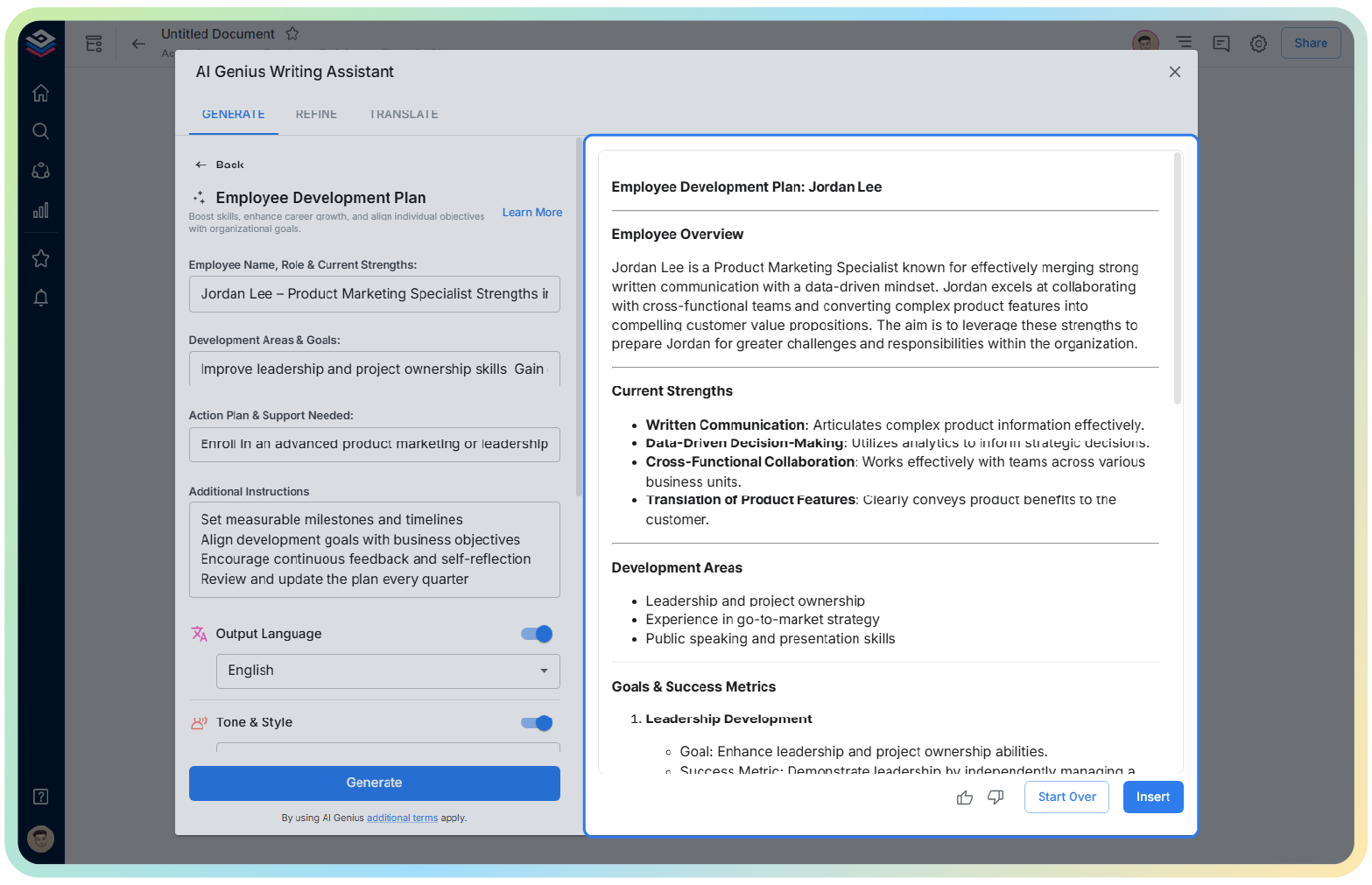
2. Type @ on a blank line to open the AI Writing Assistant.

3. Search for "Employee Evaluation Forms" in the template search field on the left sidebar.
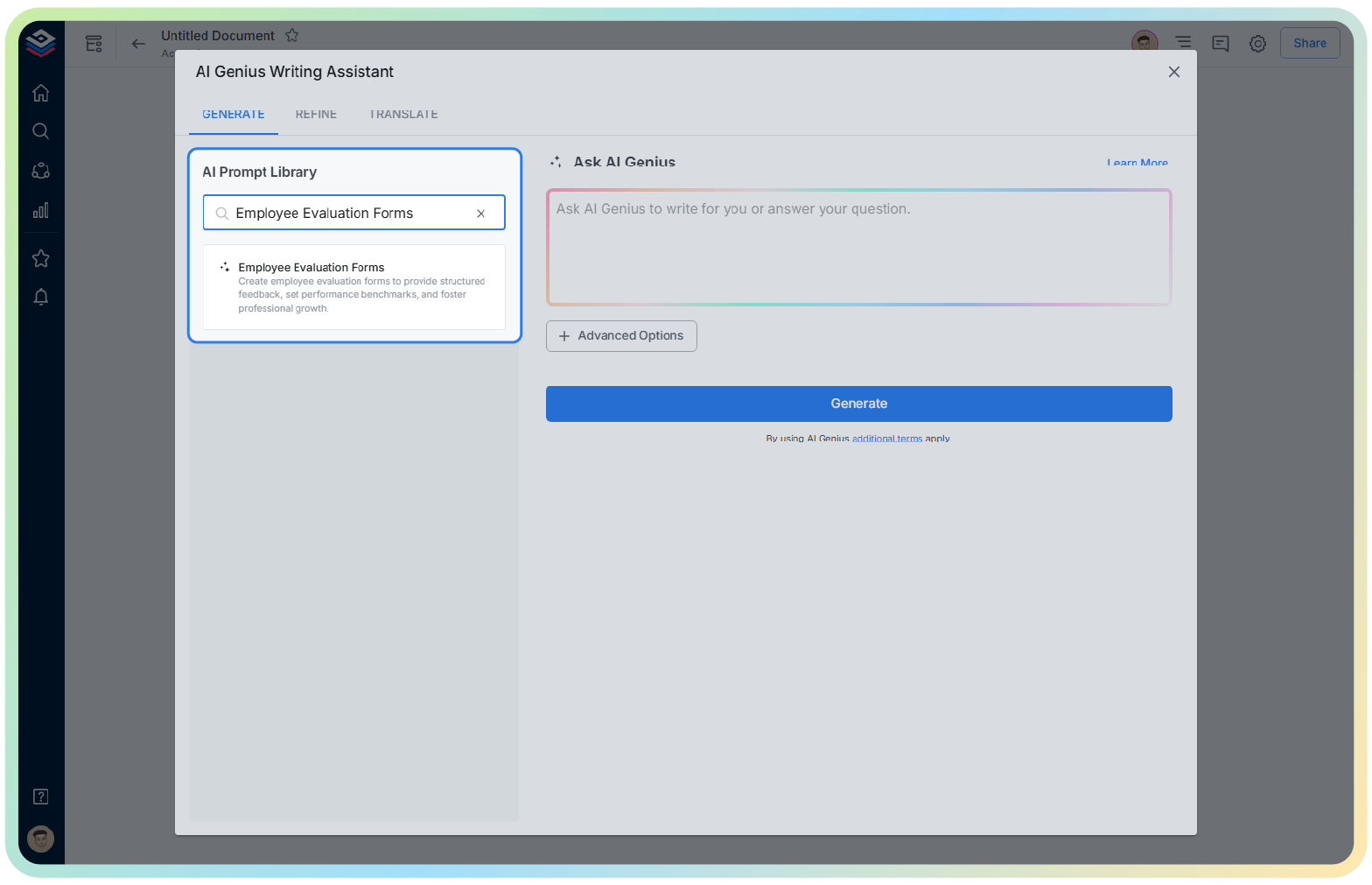
4. Select a relevant option or provide details about the employee's role, review period, and evaluation objectives.
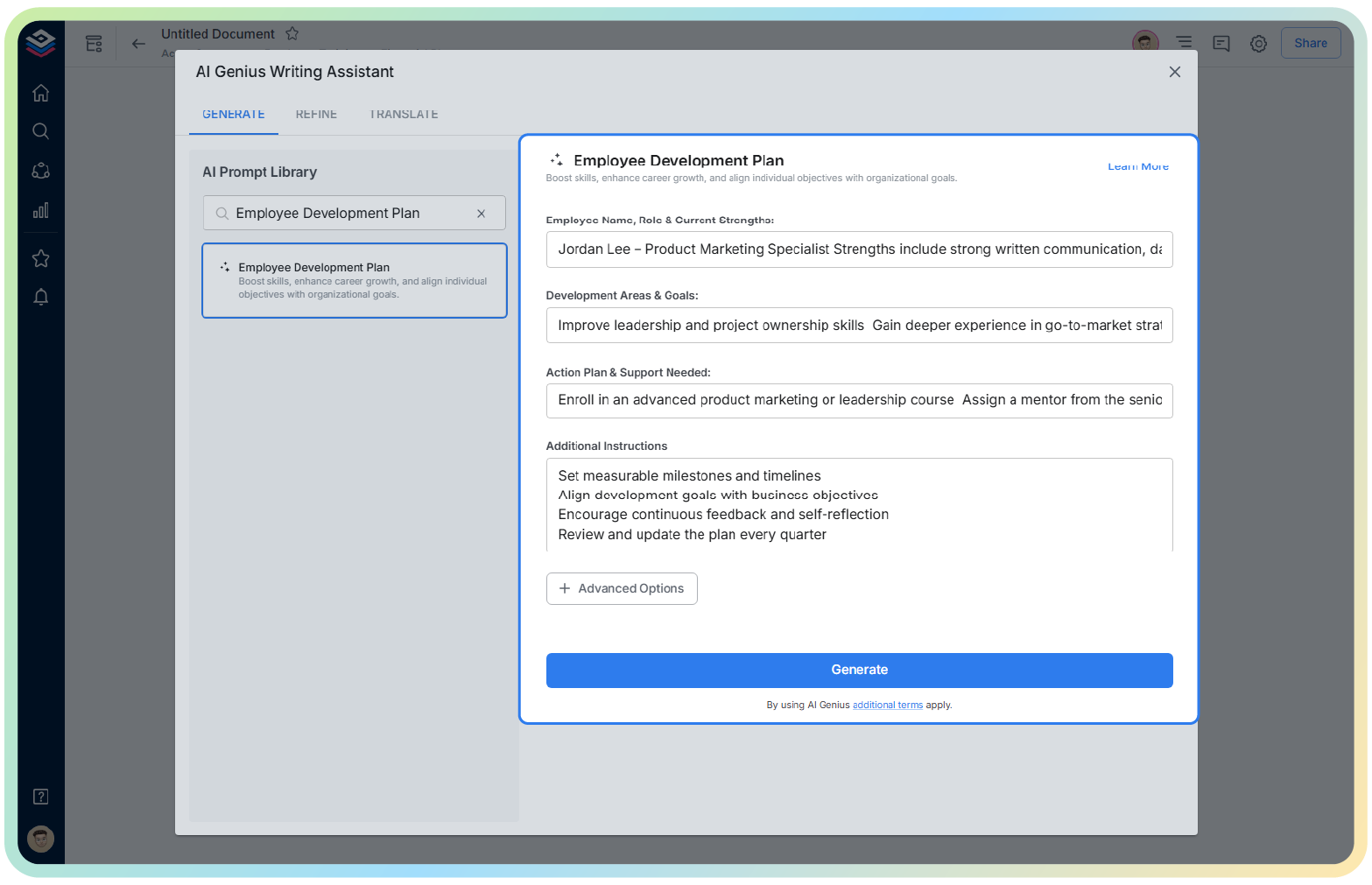
5. Use the "Available Options" to refine the questions, criteria, scoring approach, and tone to suit your organization's process.
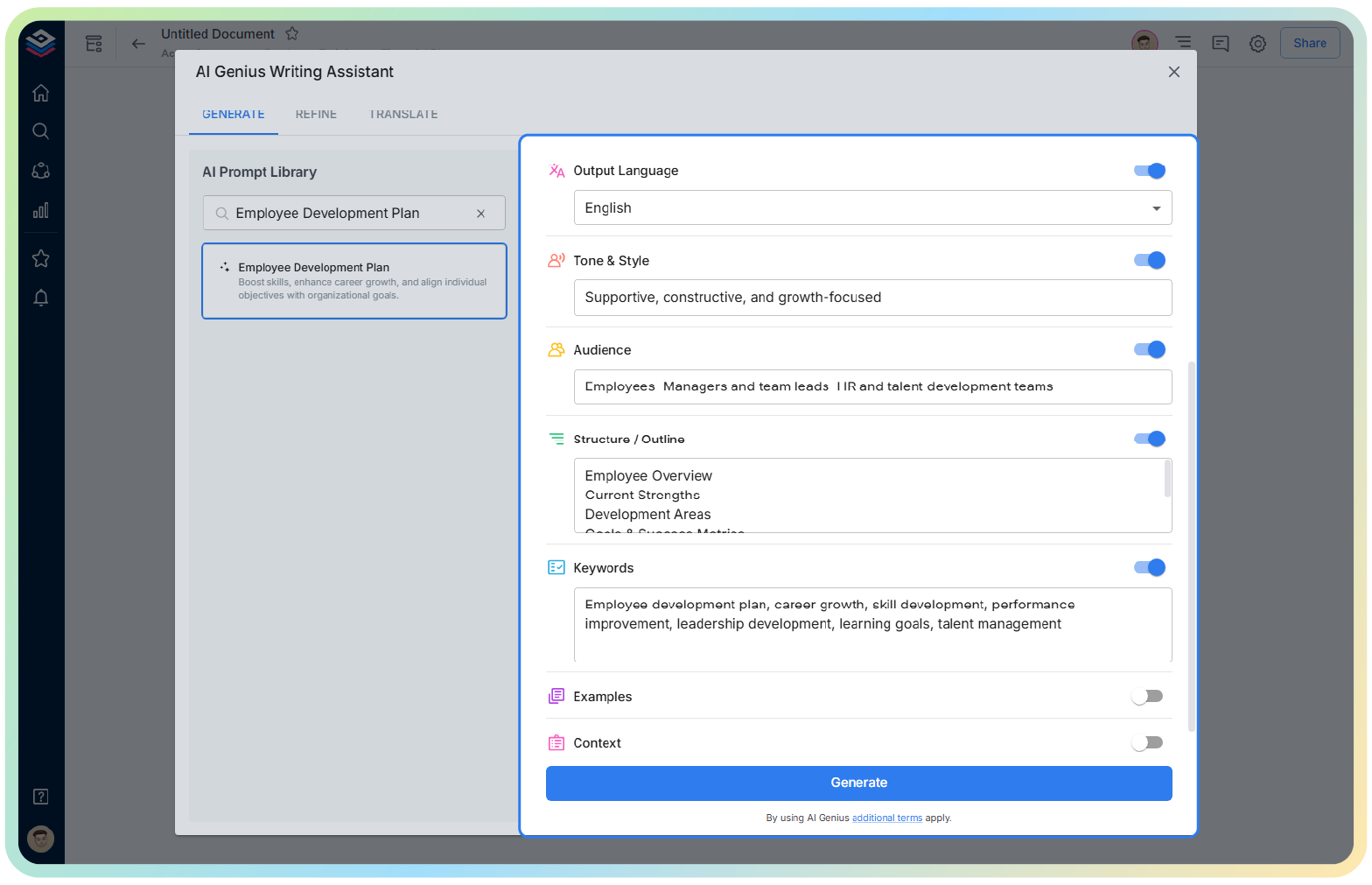
6. Insert the generated content into your Bit.ai document. Check that the criteria are relevant, the questions are clear, and the form reflects your actual performance expectations.
Employee Evaluation Form Use Cases
Employee evaluation forms can support a range of performance management activities:
- Annual Performance Reviews: Assess progress toward yearly goals, recognize contributions, and identify priorities for the next review period.
- Quarterly Check-Ins: Review recent accomplishments, discuss challenges, and adjust short-term objectives.
- Probation Reviews: Evaluate a new employee's progress against role expectations and identify any additional training or support needed.
- Self-Evaluations: Encourage employees to reflect on their accomplishments, challenges, and professional development goals before a review meeting.
- Promotion and Career Development Discussions: Organize evidence of achievements, expanded responsibilities, and readiness for future opportunities.
- Project-Based Evaluations: Review contributions to specific projects, including collaboration, problem-solving, and delivery against agreed objectives.
- Professional Development Planning: Translate feedback into learning objectives, skill-building activities, and follow-up goals.
Wrapping Up
Employee evaluations are most useful when they go beyond ratings and help people understand their progress, strengths, and next steps. Bit.ai’s Employee Evaluation Form Generator helps you create a structured starting point for performance reviews, making it easier to organize feedback and development goals.
Customize each form to your organization's review process, use relevant performance criteria, and encourage constructive conversations. With clear expectations and regular follow-up, evaluations can become a practical part of supporting employee growth and team performance.
Employee Evaluation FAQs
1. Can I tailor an evaluation form for different departments or roles?
Yes. You can customize the generated form to reflect different job responsibilities, competencies, performance expectations, and review objectives. Review each version to ensure its criteria are relevant to the role.
2. Can employee evaluation forms include both ratings and written feedback?
Yes. You can structure your document to include rating criteria alongside written feedback, examples of achievements, areas for improvement, and development goals. If you use a rating scale, define it clearly and apply it consistently.
3. Can employees complete their own evaluations?
Yes. You can adapt the form for self-assessments by including questions about accomplishments, challenges, progress toward goals, and areas where employees would like additional support.
4. How often should employee evaluations be conducted?
This depends on your organization's needs. Some organizations conduct formal annual reviews alongside quarterly check-ins or ongoing feedback conversations. Choose a schedule that supports meaningful discussions and timely follow-up.
5. How can I make employee evaluations fairer?
Use clear, role-relevant criteria, provide specific examples, apply rating standards consistently, and give employees an opportunity to share their perspective. Reviewers should also be mindful of bias and avoid relying on unsupported assumptions.
6. How should I store completed evaluation forms?
You can organize evaluation documents within your Bit.ai workspace and apply appropriate sharing permissions. Follow your organization's policies for confidentiality, access, retention, and employee records.


