


AI Project Closure Report
Wrap Up Your Projects with Precision and Professionalism
Completing a project is a milestone worth celebrating—but the work isn’t truly done until you’ve wrapped it up with a comprehensive Project Closure Report. This vital document ties up loose ends, evaluates outcomes, and ensures lessons learned are captured for future success. With Bit.ai’s Project Closure Report tool, you can create thorough, insightful reports in record time.
Ready to close your projects with confidence and clarity? Let’s dive in!
What is a Project Closure Report?
Think of it as the final chapter in your project’s story. A Project Closure Report summarizes the entire journey, from objectives and deliverables to outcomes and lessons learned. It’s a formal way to evaluate success, document challenges, and provide insights that guide future initiatives.
Why Use a Project Closure Report?
- Accountability: Document project deliverables, ensuring every objective is met and accounted for.
- Evaluation: Reflect on what worked, what didn’t, and why, creating a roadmap for improvement.
- Knowledge Sharing: Capture lessons learned to benefit future projects and avoid repeat mistakes.
- Stakeholder Communication: Provide a clear, concise overview of the project for all relevant parties.
- Closure: Officially mark the end of a project, freeing resources for new initiatives.
Why Choose Bit.ai for Project Closure Reports?
Bit.ai simplifies the process of creating detailed, impactful Project Closure Reports by offering intuitive tools and features tailored to project management needs.
- Customizable Templates: Start with ready-made templates designed for comprehensive project wrap-ups.
- Collaboration-Friendly: Involve your entire team to gather input and ensure the report is accurate and complete.
- Data Integration: Embed analytics, charts, and documents directly into your report for a rich, interactive experience.
- Highlight Successes: Use Bit.ai to showcase key achievements and milestones in a polished, professional format.
- Risk Analysis: Document challenges faced and how they were resolved, creating valuable insights for future projects.
- Knowledge Archiving: Store your Project Closure Reports within Bit.ai for easy access and reference down the line.
- Actionable Insights: Summarize recommendations and lessons learned to ensure continuous improvement.
How to Use Bit.ai’s Project Closure Report
1. Open a new document in Bit.ai.

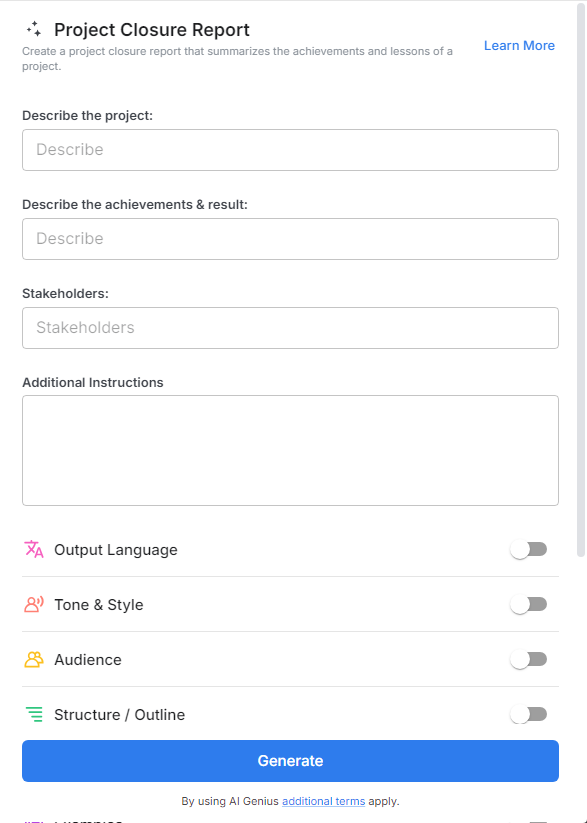
2. Type @ on a blank line to open up the AI Writing Assistant.

3. Search Instagram Post Generator from the template search field on the left sidebar.

4. Fill out the quick Instagram Post Generator entry form, and Bit.ai will generate a customized post.

5. You can use advanced settings to further customize your project closure report.

6. Click "insert' and share the report with stakeholders or archive it for future reference.
