


AI LinkedIn Article Generator
Create Impactful LinkedIn Articles That Engage and Inspire Your Network
Crafting the perfect LinkedIn article is an art—one that requires a balance between showcasing your expertise, engaging your audience, and keeping your content relevant and interesting. Whether you’re sharing thought leadership, announcing company news, or offering industry insights, writing these articles can feel like a high-pressure task. But with Bit.ai’s LinkedIn Article Generator, you can effortlessly create impactful articles that resonate with your professional network, allowing your voice to shine through without the stress.
What is a LinkedIn Article Generator?
Imagine a tool that guides you through the process of writing thoughtful, engaging LinkedIn articles that capture attention and generate conversation. The LinkedIn Article Generator does just that. It takes your ideas and turns them into polished, ready-to-publish content that feels professional and personal at the same time.
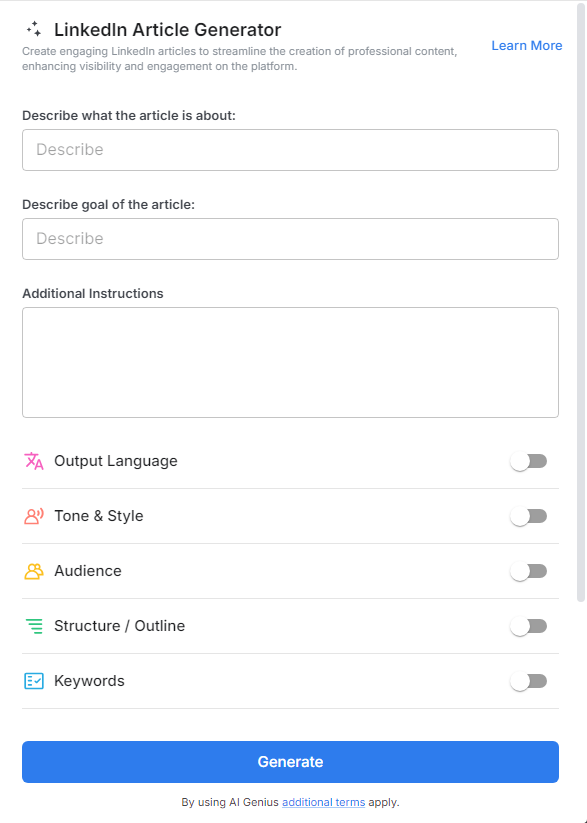
Why Use a LinkedIn Article Generator
- Effortless Idea Generation: A LinkedIn article generator helps you come up with fresh ideas and content outlines quickly, saving time and eliminating the pressure of brainstorming from scratch.
- Enhanced Engagement: By producing well-structured and engaging content, an article generator increases your chances of grabbing attention, sparking conversations, and building your professional network on LinkedIn.
- Consistency in Tone and Style: Maintain a consistent voice across your posts, ensuring that every article aligns with your personal or company branding and resonates with your audience.
- Save Time and Effort: A LinkedIn article generator streamlines the writing process, helping you create high-quality content faster, while still maintaining a professional edge.
Why Use Bit.Ai's LinkedIn Article Generator?
- Efficient Content Creation for Busy Professionals: Writing a LinkedIn article takes time, especially when juggling multiple responsibilities. With Bit.ai’s LinkedIn Article Generator, you get a head start on content creation, allowing you to focus on the message while cutting down on writing time.
- Engage and Connect with Your Audience: Bit.ai helps you create articles that aren’t just informative but also engaging. With easy-to-follow prompts, you can add a personal touch that invites your readers to comment, share, and start meaningful conversations.
- Stay Consistent with Your Personal Brand: Your LinkedIn articles should reflect your professional voice. Bit.ai ensures that your articles are consistently aligned with your tone, whether you’re writing something casual, insightful, or authoritative, making your content feel authentic every time.
- Maximize Visibility and Reach: Writing a great article is only half the battle—getting it seen is the other. Bit.ai provides you with tips and ideas on how to structure your article for maximum visibility, ensuring it reaches the widest possible audience within your network.
- Industry-Relevant Suggestions: Bit.ai doesn’t just offer generic ideas. It tailors its content suggestions based on your industry and niche, providing article ideas and themes that are highly relevant to your audience. Whether you’re in tech, finance, marketing, or another sector, you’ll always have fresh, on-point content to share.
- Headline Inspiration that Grabs Attention: Crafting a headline that stops the scroll is crucial on LinkedIn. Bit.ai offers a range of headline ideas that are designed to capture attention while staying relevant to your article’s content. From catchy to thought-provoking, your headline will pull readers in.
- Thoughtful Article Structures: Writing a great LinkedIn article isn’t just about what you say, but how you say it. Bit.ai helps you organize your thoughts, offering article structures that keep your content clear, concise, and engaging, making sure your message hits home.
How to Use Bit.ai’s LinkedIn Article Generator
1. Open a new document in Bit.ai.

2. Type @ on a blank line to open up the AI Writing Assistant.


4. Fill out the quick Instagram Post Generator entry form, and Bit.ai will generate a customized post.

5. Personalize it by clicking on 'Advanced Options' to add your unique voice or tweak the style to match your brand.

6. Once you're done, click 'Insert,' and it'll be added to your Bit document.
