


AI Freelance Invoice
Simplify Your Invoicing Process
In the fast-paced world of freelancing, time is money—and spending hours on invoicing can feel like a waste. Whether you’re sending out one invoice or juggling multiple clients, the process of creating, managing, and sending invoices can quickly become overwhelming. That’s where Bit.ai’s Freelance Invoice tool comes in, making invoicing as simple as clicking a button.
Let’s dive into how Bit.ai’s Freelance Invoice tool can save you time, keep you organized, and ensure you get paid quickly and professionally.
What is a Freelance Invoice?
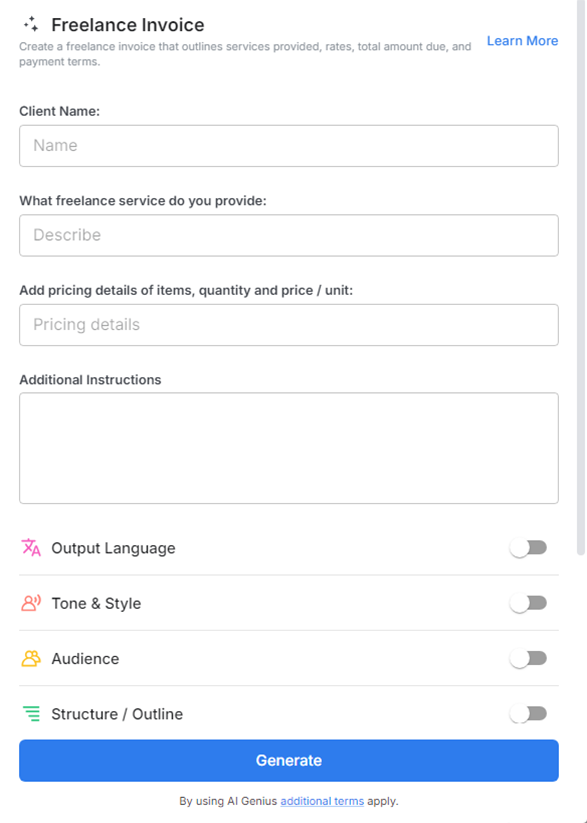
A Freelance Invoice on Bit.ai is your digital assistant for creating professional, accurate invoices with minimal effort. This AI-powered tool helps you generate detailed invoices in just a few clicks, including your hourly rates, project fees, and payment terms, ensuring you’re always on top of your finances.
Why Use a Freelance Invoice ?
- Time Saver: Stop wasting hours on formatting and calculations. This tool lets you create and send invoices quickly, giving you more time to focus on what matters—your work.
- Customizable: From payment terms to client details, Freelance invoices are fully customizable to fit the unique needs of your projects and clients.
- Professional & Clear: Impress your clients with clean, well-structured invoices that reflect your professionalism and ensure prompt payment.
- Error-Free: Bit.ai helps eliminate costly mistakes by automating calculations and providing templates with all the necessary details, so you never miss a thing.
- Easy Tracking: Keep track of your invoices, due dates, and payments all in one place, so you can stay on top of your financials without the hassle.
Why Choose Bit.ai for Your Freelance Invoices?
Bit.ai takes the guesswork out of invoicing. With its easy-to-use features, you can generate invoices that look polished, are accurate, and are ready to send to your clients, all without the stress of manual work.
- Quick & Efficient Invoicing: With just a few clicks, you can generate detailed invoices in no time. Bit.ai speeds up the entire process, allowing you to focus on delivering quality work.
- Customizable & Flexible: Bit.ai’s invoices are adaptable to your specific needs. Whether you charge hourly, per project, or with a retainer, you can adjust the invoice template to fit any pricing structure.
- Track & Manage Payments: Bit.ai allows you to track sent invoices, monitor payment statuses, and manage overdue invoices all in one place.
- Cloud-Based Convenience: Store, access, and share your invoices from anywhere. Whether you’re working from a coffee shop or your home office, Bit.ai keeps your invoices organized and accessible.
- Professional Image: Sending a professional invoice helps build trust with clients. Bit.ai’s templates ensure that your invoices always look clean and polished, no matter how many clients you have.
How to Use Bit.ai’s Freelance Invoice Tool
1. Open a new document in Bit.ai.

2. Type @ on a blank line to open up the AI Writing Assistant.


4. Fill out the quick Instagram Post Generator entry form, and Bit.ai will generate a customized post.

5. Personalize your invoice with 'advanced settings' by adding or adjusting any specific items or terms.

6. Once you’re satisfied, click ‘Insert,’ and your invoice will be ready to send.
