


AI Escalation Procedures
Wave Goodbye to Confusion and Hello to Clear Communication!
Managing escalation procedures can be challenging, especially when clarity and quick response times are critical. If staying organized and maintaining a seamless communication flow are top priorities, Bit.ai’s Escalation Procedures is here to help! With this tool, you’ll ensure every team member knows exactly how to escalate issues—without the guesswork or confusion.
Ready to streamline your process? Let’s explore how Bit.ai’s Escalation Procedures can bring structure and simplicity to even the most complex situations!
What is the Escalation Procedures?
Think of Bit.ai’s Escalation Procedures as your organization’s playbook for handling high-stakes situations. It provides clear, step-by-step guidance on how to elevate concerns, resolve issues, and involve the right people at the right time. With this tool, every escalation is streamlined, structured, and actionable, allowing your team to focus on solutions without unnecessary delays.
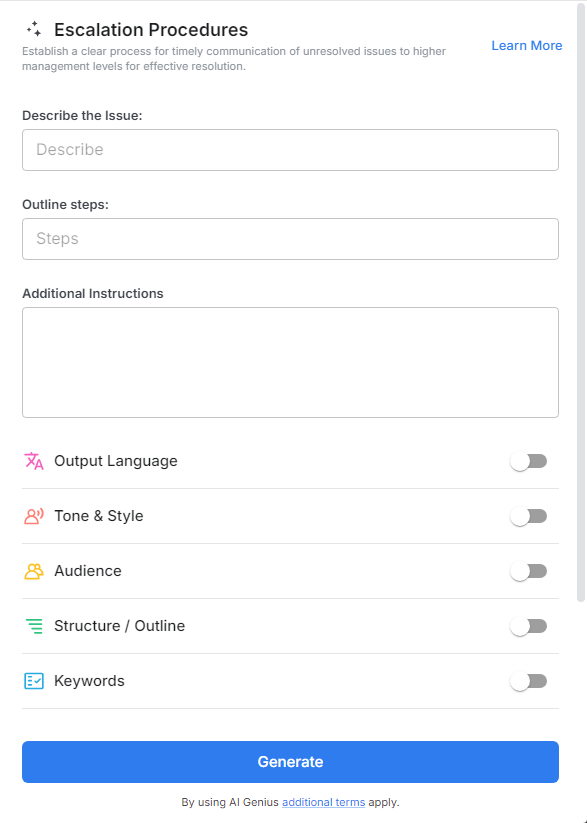
Why Use the Escalation Procedures?
- Clear Communication Pathways: Outline who to contact at each escalation level, reducing confusion and ensuring smooth communication.
- Defined Response Times: Set specific timeframes for responses and resolutions, so everyone is aware of the urgency and expected timelines.
- Role-Based Escalations: Tailor escalation steps based on team roles, making sure each person knows their responsibilities in high-priority situations.
- Accessible Documentation: Keep all procedures organized and accessible within Bit.ai, so your team can easily refer to escalation guidelines when needed.
- Tracking and Documentation: Log each escalation for future reference, enabling your team to learn from past cases and continuously improve processes.
Why Use Bit.ai for Your Escalation Procedures?
Bit.ai’s Escalation Procedures is more than just a guide; it’s a framework for success in any scenario. Here’s why Bit.ai is the best choice for managing escalation procedures with precision and confidence:
- Seamless Collaboration Across Teams: With Bit.ai, team members can collaborate in real-time to update procedures, ensuring everyone’s input is reflected and the latest details are accessible to all.
- Customizable Templates for Unique Scenarios: From customer support to internal operations, Bit.ai’s templates can be customized to match the specific needs of any department or escalation type.
- Automated Alerts and Reminders: Keep critical escalations on track with automated reminders for follow-ups and responses, reducing the chance of delays or oversight.
- Role-Based Access Control: Bit.ai lets you set permissions so only authorized team members can access sensitive escalation documents, protecting confidential information.
- Integrated Communication Channels: Link to relevant team channels or contacts within each step of your escalation process, ensuring that the right people are notified immediately.
- Design Automation for Consistency: Bit.ai’s design features help you maintain a standardized format for all procedures, making it easy for team members to follow steps and adhere to protocols.
How to Use Bit.ai’s Escalation Procedures
1. Open a new document in Bit.ai.

2. Type @ on a blank line to open up the AI Writing Assistant.

3. Search Instagram Post Generator from the template search field on the left sidebar.

4. Fill out the quick Instagram Post Generator entry form, and Bit.ai will generate a customized post.

5. Customize the content by clicking ‘Advanced Options’ to specify team roles, timeframes, or other details.

6. Once you're done, click 'Insert,' and it'll be added to your Bit document.
