


AI Employee Departure Email
Bid Farewell with Gratitude and Professionalism
An employee departure email is a thoughtful and professional way to bid farewell to a team member who is leaving the organization. Whether they are moving on to new opportunities, retiring, or simply taking a break, a well-crafted departure email is essential for expressing appreciation for their contributions and maintaining a positive relationship. Crafting the perfect farewell message, however, can be tricky, especially when you want to leave a lasting impression.
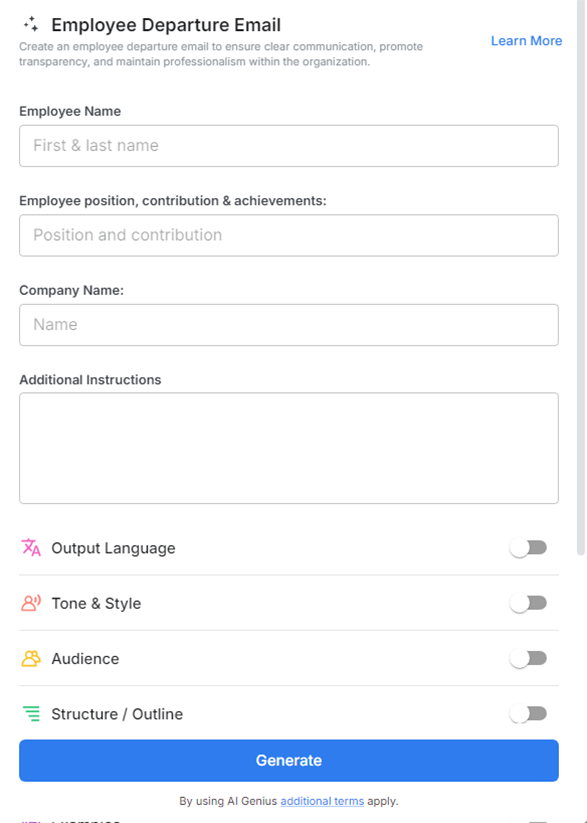
Bit.ai’s Employee Departure Email makes it simple to compose polished emails that express gratitude, offer well-wishes, and keep the tone professional. Whether you're sending the email on behalf of HR, a manager, or a colleague, Bit.ai ensures that the message is thoughtful, clear, and impactful.
What is an Employee Departure Email?
An Employee Departure Email is a formal communication sent to inform the team when an employee is leaving the company. The email typically includes an appreciation of the departing employee’s contributions, recognizing their hard work, achievements, and the positive impact they made during their time with the company. Well wishes are also an important part of the message, as they offer the employee success in their future career, personal endeavors, or next steps.
Why Use an Employee Departure Email?
- Professional Closure: Ensures a respectful and formal goodbye, leaving a positive impression on departing employees.
- Acknowledges Contributions: Highlights the employee’s impact and achievements, showing gratitude for their time with the organization.
- Maintains Team Morale: Communicates the departure to the team in a thoughtful way, helping manage transitions and maintain cohesion.
- Facilitates Transition: Provides clarity about next steps, interim responsibilities, or team adjustments to ensure a smooth workflow.
- Reinforces Employer Brand: Demonstrates professionalism and care, leaving a lasting positive impression on both current and former employees.
Why Use Bit.ai for Your Employee Departure Emails?
Bit.ai’s Employee Departure Email Tool is designed to streamline the process of crafting professional, personalized, and impactful farewell messages. Here’s why Bit.ai is the go-to tool for creating employee departure emails:
- Customizable Templates: Choose from a variety of pre-designed, customizable templates specifically created for employee departure emails. Whether you want a formal or more casual tone, Bit.ai’s templates have you covered.
- Easy Personalization: Add the employee’s name, role, contributions, and personal touch to make the farewell email unique and sincere. Personalizing the email helps to make the employee feel valued and appreciated.
- Real-Time Collaboration: If you need input from colleagues, HR, or team leads, Bit.ai enables real-time collaboration so that everyone can contribute to the final email draft, ensuring it reflects the team’s collective thoughts.
- Engaging Visuals: Bit.ai allows you to add graphics, icons, and celebratory images to your email, enhancing the farewell message and making it more memorable.
- Streamlined Distribution: Once you’ve created the email, Bit.ai allows you to distribute it quickly via email or download it as a PDF for physical handouts or sharing through other platforms.
- Tracking and Analytics: Bit.ai’s analytics feature lets you track how many employees opened and interacted with the farewell email, ensuring that your message was well-received.
How to Use Bit.ai’s Employee Departure Email
1. Open a new document in Bit.ai.

2. Type @ on a blank line to open up the AI Writing Assistant.

3. Search Instagram Post Generator from the template search field on the left sidebar.

4. Fill out the quick Instagram Post Generator entry form, and Bit.ai will generate a customized post.

5. Add sections to express gratitude for their time with the company.

6. Click 'Insert' to finalize your employee departure email, ready to send and convey appreciation and best wishes to the departing employee.
