


AI Email Responder
Transform Your Email Replies into Engaging Conversations
We all know that effective communication is important, especially when it comes to responding to emails. Whether you’re managing customer inquiries, following up with prospects, or simply keeping in touch, your email responses need to be quick, clear, and engaging. If crafting the perfect reply feels like a daunting task, Bit.ai is here to help!
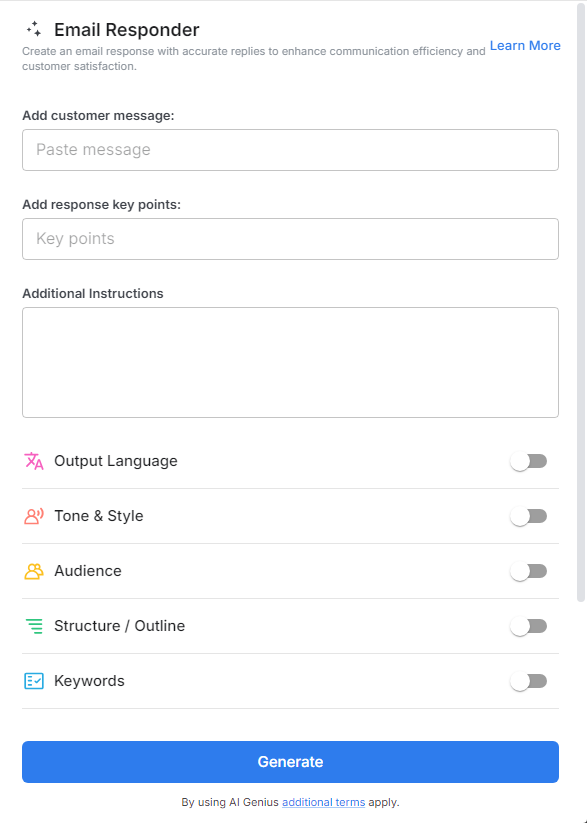
With Bit.ai’s Email Responder, you can create thoughtful, personalized email replies that resonate with your recipients, all without the hassle of starting from scratch every time. Let’s explore this powerful tool, its numerous benefits, and how Bit.ai simplifies your email communication!
What is an Email Responder?
Imagine having a trusty sidekick that helps you draft the perfect email responses to a variety of situations. That’s what the Email Responder is all about! This tool enables you to create well-crafted replies in just a few clicks, ensuring your communications are both efficient and effective.
Why Use an Email Responder?
- Time Saver: Let’s face it, no one wants to spend hours crafting email responses! The Email Responder speeds up the process, allowing you to focus on what truly matters while maintaining prompt communication.
- Creativity Booster: Ever find yourself staring at a blank screen, unsure of how to reply? This tool provides a plethora of templates and ideas, giving your creativity the kickstart it needs to write engaging messages.
- Consistency Creator: Maintain a consistent tone and style across all your replies. With the Email Responder, you can ensure your communications always reflect your brand’s voice, leaving a lasting impression on your recipients.
- User-Friendly: You don’t need to be a professional writer to craft captivating replies. The Email Responder’s intuitive design makes it easy for anyone to create impactful email responses that stand out.
- Versatile & Adaptive: From customer support queries to follow-up messages and everything in between, the Email Responder can be tailored to suit any scenario, ensuring you’re always prepared for any correspondence.
Why Use Bit.ai to Generate Email Responses?
When it comes to managing your email correspondence, Bit.ai’s Email Responder stands out as a remarkable tool. Here’s how it can transform the way you communicate:
- Swift and Engaging Replies: With Bit.ai, you can create engaging email responses in the blink of an eye. Forget the stress of crafting the perfect reply—this tool allows you to focus on the message, making each response feel genuine and thoughtful. You’ll be able to connect with your audience effortlessly, ensuring your replies are memorable.
- Tailored Messaging for Every Recipient: Each recipient is unique, and Bit.ai recognizes that! The Email Responder allows you to customize your messages based on the recipient’s preferences, ensuring your replies hit the mark. Whether you’re responding to a customer’s inquiry or following up with a colleague, you can adapt your tone and style to create meaningful connections.
- Keyword Optimization: Incorporate relevant keywords seamlessly to enhance the visibility of your email responses. By using terms that resonate with your audience, you can improve the chances of your emails standing out in crowded inboxes and being noticed.
- Consistent Brand Voice: Your brand’s personality should shine through in every communication. With Bit.ai, you can ensure that your email responses align perfectly with your brand’s tone, whether you want to be professional, friendly, or witty. This consistency helps build trust and recognition among your audience.
- Collaborative Features for Team Efforts: If you’re working with a team, Bit.ai’s collaborative features allow you to brainstorm and refine email responses together. It’s like a creative workshop for your email strategies, where everyone’s ideas can come together to create the perfect response.
- Organized Email Management: Keep all your email templates and responses organized within Bit.ai, making it easy to find what you need when it’s time to hit send. No more searching through endless drafts—everything you need is just a click away!
How To Use Bit.ai Email Responder
1. Open a new document in Bit.ai.

2. Type @ on a blank line to open up the AI Writing Assistant.


4. Fill out the quick Instagram Post Generator entry form, and Bit.ai will generate a customized post.

5. Personalize the response by clicking on ‘Advanced Options’ to infuse your unique voice or tweak the tone to suit your audience.

6. Once satisfied, hit ‘Insert,’ and your tailored reply will be added to your Bit document for easy access.
