


AI Donor Thank You Letter
Wave Goodbye to Generic Thank-You’s and Hello to Heartfelt Appreciation!
Crafting the perfect thank-you letter is essential for showing genuine appreciation and keeping donors connected to your mission. But if writing letters of gratitude feels daunting or repetitive, Bit.ai’s Donor Thank You Letter is here to help! With this tool, expressing heartfelt thanks to each donor is easier than ever, giving you a way to convey appreciation that’s memorable and meaningful.
Ready to make your donor outreach truly impactful? Let’s explore how Bit.ai’s Donor Thank You Letter transforms the process of writing meaningful acknowledgments!
What is the Donor Thank You Letter?
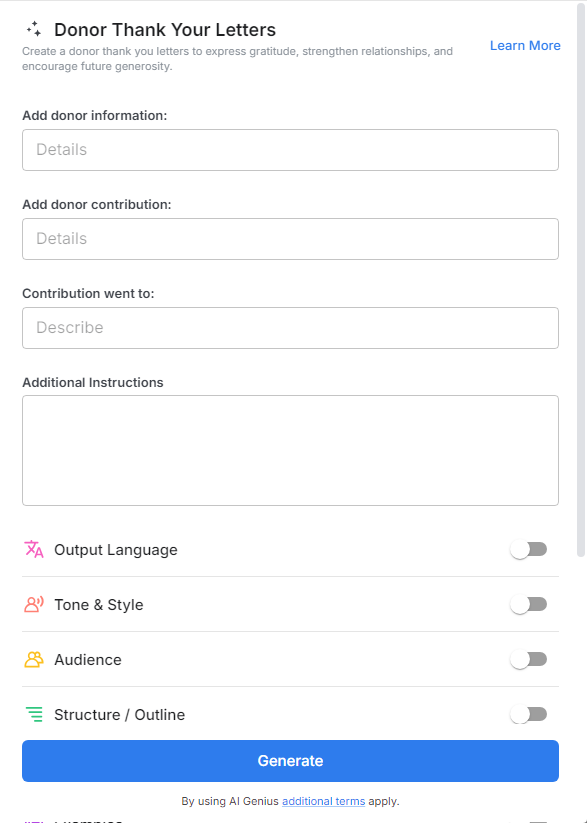
Imagine having a that helps you instantly create personalized thank-you letters that resonate with your donors. Bit.ai’s Donor Thank You Letter provides templates and ideas that let you tailor messages to each contributor, ensuring your gratitude shines through. From recognizing their specific support to sharing the impact of their contribution, Donar Thank You Letter ensures that every letter feels as special as the donor who receives it.
Why Use the Donor Thank You Letter?
- Personalized Messages in Minutes: Quickly craft tailored letters that reflect each donor’s unique contribution, helping to build a lasting connection.
- Variety of Templates: Choose from a range of templates designed for different donor types, from first-time supporters to long-time patrons.
- Impactful Language Suggestions: Not sure how to express the full depth of your appreciation? Bit.ai provides language prompts to help you communicate your thanks sincerely and eloquently.
- Professional Formatting: Ensure each thank-you letter is visually polished and ready to make a great impression on your donors.
- Follow-Up Reminders: Set reminders for follow-up letters or additional outreach to maintain a strong relationship with your supporters over time.
Why Use Bit.ai for Your Donor Thank You Letters?
Bit.ai’s Donor Thank You Letter goes beyond templates. It makes gratitude meaningful and helps you build stronger relationships with your donors. Here’s why Bit.ai is the perfect partner for donor appreciation:
- Seamless Collaboration Across Teams: Need input from other team members to personalize a letter? Bit.ai allows for real-time collaboration, letting everyone contribute their perspective and insights to each message.
- Consistent Tone of Gratitude: Maintain a unified tone across all thank-you letters, ensuring your organization’s voice is warm, sincere, and consistent, no matter who is drafting it.
- Impact Tracking with Metrics: Measure the effectiveness of your donor communications by tracking open and response rates, helping you refine your approach for future outreach.
- AI-Powered Language Enhancements: Access AI suggestions for phrasing, style, and tone, making it easier to convey heartfelt gratitude with just the right words.
- Customizable Letter Templates: Personalize templates to reflect your organization’s mission and values, letting your unique story and vision come through in each thank-you.
- Design Automation for a Polished Look: With Bit.ai’s design features, you can ensure every letter looks beautifully organized and professional, creating a positive, lasting impression for your donors.
How to Use Bit.ai’s Donor Thank You Letter
1. Open a new document in Bit.ai.

2. Type @ on a blank line to open up the AI Writing Assistant.

3. Search Instagram Post Generator from the template search field on the left sidebar.

4. Fill out the quick Instagram Post Generator entry form, and Bit.ai will generate a customized post.

5. Customize the content by clicking ‘Advanced Options’ to add a personal note or details about their specific impact.

6. Once you're done, click 'Insert,' and it'll be added to your Bit document.
