


AI Design Project Proposal
Improve Your Pitching Game
In the competitive world of design, presenting your ideas effectively is crucial to winning clients and securing projects. A well-crafted design project proposal not only communicates your vision but also showcases your professionalism and expertise.
Are you struggling to create proposals that truly capture your clients’ attention? With Bit.ai’s Design Project Proposal tool, you can easily craft compelling proposals that resonate with your audience and elevate your design business—all while saving valuable time and effort.
Let’s dive into the fantastic features of this tool, why you should utilize it, and how Bit.ai simplifies the proposal process!
What is a Design Project Proposal?
A Design Project Proposal is a comprehensive document that outlines your design ideas, project scope, timeline, and budget. It serves as a roadmap for your clients, detailing how you plan to bring their vision to life. With Bit.ai’s Design Project Proposal tool, you can create stunning proposals that not only inform but also inspire.
Why Use a Design Project Proposal Tool?
- Professional Presentation: A polished proposal enhances your credibility and attracts clients with eye-catching visuals and organized content.
- Clear Structure: Easily organize your proposal to ensure all critical elements are presented coherently, facilitating better understanding.
- Customizable Templates: Adapt templates for each client to create tailored proposals that align with specific project needs.
- Streamlined Collaboration: Collaborate in real time with teams and clients, allowing for instant feedback and revisions.
- Budget Transparency: Clearly present project costs, building trust and reducing misunderstandings with clients.
Why Use Bit.ai for Your Design Project Proposal?
- Rapid Proposal Creation: Quickly create high-quality proposals, saving time and allowing you to focus on other business aspects.
- Interactive Elements: Incorporate links, videos, and visuals to enhance engagement and enrich your proposal.
- Organized Documentation: Store all proposals in one place for easy access and updates, ensuring you’re always prepared.
- Version Control: Track changes and manage revisions effortlessly, keeping everyone aligned throughout the proposal process.
- Analytics Insights: Gain valuable insights into how clients interact with your proposals, allowing you to refine your approach and improve future submissions.
- Client Feedback Integration: Easily incorporate client feedback directly into proposals, ensuring their needs are met and enhancing satisfaction.
- Scalable Solutions: Whether you’re a freelancer or part of a larger team, Bit.ai’s features can scale to fit your needs, making it suitable for projects of any size.
How to Use Bit.ai’s Design Project Proposal Tool
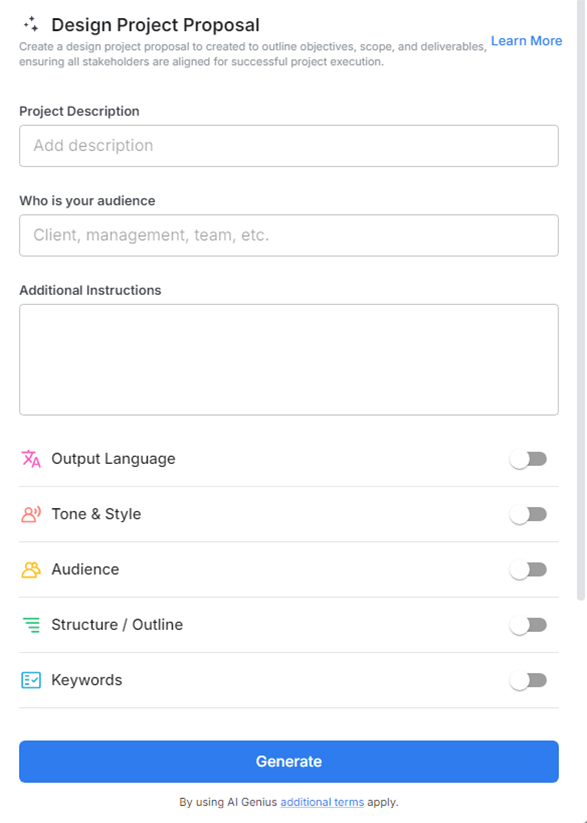
1. Open a new document in Bit.ai.

2. Type @ on a blank line to open up the AI Writing Assistant.


4. Fill out the quick Instagram Post Generator entry form, and Bit.ai will generate a customized post.

5. Personalize it by clicking on ‘Advanced Options’ to infuse your unique voice and tweak the style to align with your brand.

6. Once you’re satisfied, click ‘Insert,’ and it’ll be added to your Bit document.
