


AI Design Pitch
Elevate Your Presentations with Compelling Design Pitches
Presenting your ideas effectively can be the difference between securing a client and missing out on an opportunity. Crafting a compelling design pitch that captivates your audience is essential. Enter Bit.ai’s Design Pitch —your ultimate companion for creating visually stunning and persuasive presentations.
Are you finding it challenging to articulate your design concepts clearly and engagingly? With Bit.ai’s Design Pitch, you can effortlessly develop pitches that not only showcase your creativity but also resonate with your audience—all while saving time and effort.
Let’s explore this powerful tool, why you should embrace it, and how Bit.ai streamlines the design pitching process.
What is a Design Pitch?
A Design Pitch is like having a personal assistant dedicated to helping you create compelling presentations. This AI-powered tool enables you to build engaging pitch documents that highlight your design ideas, ensuring you communicate your vision effectively to clients and stakeholders.
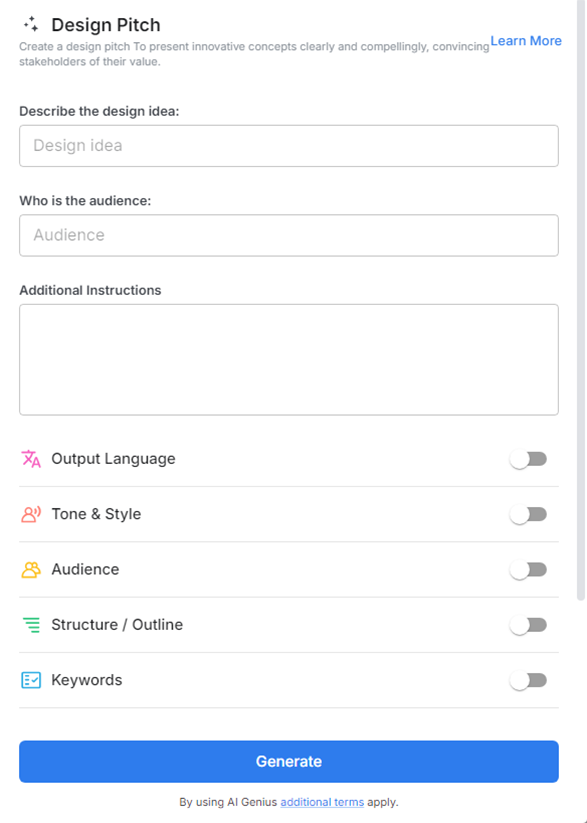
Why Use a Design Pitch?
- Engaging Presentations: Create visually appealing pitches that grab attention and leave a lasting impression on your audience.
- Streamlined Process: Save time by utilizing pre-designed templates and smart suggestions, allowing you to focus on your ideas rather than formatting.
- Clear Communication: Ensure your concepts are articulated clearly, helping your audience understand and appreciate your design vision.
- Customizable Templates: Choose from a variety of templates tailored for different design projects, making it easy to maintain consistency and professionalism.
- Interactive Elements: Incorporate interactive features like links, videos, and visuals to enhance engagement and provide a dynamic presentation experience.
Why Use Bit.ai for Your Design Pitch?
With Bit.ai’s Design Pitch, transforming your design concepts into captivating presentations is a breeze. Here’s how this exceptional tool can elevate your pitching game:
- Rapid Creation: Quickly generating polished design pitches is essential in a fast-paced environment. With Bit.ai, you can create high-quality presentations in a fraction of the time it would take using traditional methods. The intuitive interface and smart suggestions help streamline the creation process, allowing you to focus on crafting your message and delivering it with impact.
- Collaborative Features: Design is often a collaborative effort, and Bit.ai recognizes that. With its collaborative features, you can invite team members to join in the pitch creation process. This real-time collaboration fosters creativity, as you can brainstorm together, provide immediate feedback, and make revisions on the fly, ensuring that your final pitch is a product of collective input and expertise.
- Organized Documentation: Keeping your design pitches organized is crucial for efficiency and effectiveness. Bit.ai’s platform allows you to store all your pitches in one centralized location, making it easy to retrieve and refine them whenever necessary. This organization reduces the risk of losing important documents and ensures that you always have access to your work.
- Visual Cohesion: Consistency in branding and messaging is key to making a strong impression. With Bit.ai’s customizable templates, you can maintain visual cohesion across your presentations. This consistency reinforces your brand identity and helps establish trust with your audience, as they see a professional and polished representation of your work.
- Enhanced Accessibility: Bit.ai’s cloud-based platform ensures that you can access your design pitches from anywhere, on any device. This flexibility is invaluable, especially in today’s remote and hybrid work environments. Whether you’re in the office, at home, or traveling, you can review, edit, or present your work seamlessly, ensuring that you’re always prepared to seize opportunities.
- Version Control: The ability to track changes and manage revisions is vital in the design process. Bit.ai’s version control feature allows you to keep a detailed history of your design pitches, making it easy to revert to previous versions if necessary. This is particularly useful for teams, as it ensures that everyone is aligned with the latest updates and can revisit earlier concepts without losing valuable insights.
How to Use Bit.ai’s Design Pitch
1. Open a new document in Bit.ai.

2. Type @ on a blank line to open up the AI Writing Assistant.


4. Fill out the quick Instagram Post Generator entry form, and Bit.ai will generate a customized post.

5. Add reference links, mood boards, and color preferences to guide designers visually.

6. Click 'Insert' to add your design pitch to your Bit document, ready for further development or sharing.
