


AI Design Feedback & Revision Logs
Streamline Your Creative Workflow with Organized Feedback and Revision Histories
Feedback is the fuel that transforms good designs into great ones...but, as any designer knows, managing feedback and tracking revisions can be a complex, chaotic process. Miscommunication, scattered notes, and missed changes can quickly disrupt a project’s flow, slowing down production and creating frustration on all sides.
Bit.ai’s Design Feedback & Revision Logs solve this problem by providing a central, organized space for all your feedback, version histories, and revisions—keeping your projects efficient, transparent, and on track.
Let’s dive into why Bit.ai’s Design Feedback & Revision Logs are a game-changer for designers, teams, and anyone who collaborates on visual projects.
What is Design Feedback & Revision Logging?
Design Feedback & Revision Logs are essential tools within Bit.ai, crafted specifically to streamline your creative feedback process. This tool allows you to consolidate all feedback, track every version, and log revisions in one unified workspace. Instead of searching through endless email chains or trying to remember which version had that one critical note, Bit.ai makes it easy to access, review, and action every piece of feedback.
With Bit.ai’s Design Feedback & Revision Logs, you get an organized, centralized hub for all design-related discussions, making collaboration seamless and ensuring nothing slips through the cracks.
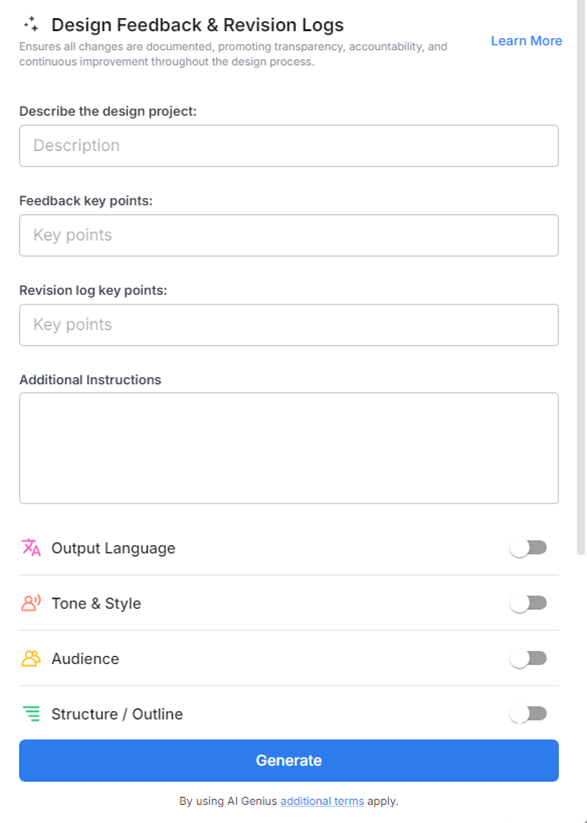
Why Use a Design Feedback & Revision Log?
- Organized Feedback: Keep all client and team feedback in one place, making it easy to refer back to and ensuring no comments get lost in the process.
- Streamlined Revisions: Track each revision and change, helping you maintain a clear history of edits and ensuring consistency across the design project.
- Enhanced Collaboration: Encourage open communication and real-time updates, allowing team members and clients to review and add feedback seamlessly.
- Improved Accountability: Assign tasks and responsibilities to specific team members, helping to ensure that each piece of feedback is addressed and implemented.
- Time Efficiency: Save time by organizing feedback in a structured manner, reducing back-and-forth and allowing for faster approval and completion of designs.
Why Use Bit.ai’s Design Feedback & Revision Logs?
1. Organized Feedback at Your Fingertips- Each piece of feedback is logged and organized by version, making it easy to track changes, understand the rationale behind revisions, and keep the project moving in the right direction. This organized structure helps you focus on creating rather than chasing down feedback.
2. Clear Version Histories for Every Revision- Bit.ai’s Design Feedback & Revision Logs automatically save each version, ensuring you always have a record of previous iterations. This makes it simple to backtrack if needed, reference earlier ideas, or show the evolution of a design.
3. Seamless Collaboration & Real-Time Updates- Bit.ai enables your team to provide real-time feedback, log updates instantly, and see revisions as they happen. It’s like having everyone in the same virtual workspace, offering input that’s actionable and instantly visible.
4. Traceable Design Evolution- Bit.ai’s Design Feedback & Revision Logs provide a traceable journey of your project’s development, so you can track the decisions that shaped the final product. This transparency not only builds confidence in the design process but also allows you to communicate changes clearly to clients and stakeholders.
5. Minimized Miscommunication- With Bit.ai, feedback is structured, organized, and easy to interpret, minimizing the chance of misunderstandings or overlooked requests. Each comment and revision is clearly documented, making it easy for everyone to be on the same page—literally.
6. Personalized & Accessible for Any Design Workflow- Bit.ai’s tool is adaptable to any design workflow, from quick mockups to comprehensive branding projects. You can customize feedback formats, prioritize revisions, and ensure the feedback aligns perfectly with your creative process.
7. One Workspace for All Design Assets- Bit.ai doesn’t just handle feedback; it also serves as a central repository for all your design assets. Keep files, drafts, and finalized versions in one place, organized and easily accessible for reference at any stage.
How to Use Bit.ai’s Design Feedback & Revision Logs
1. Open a new document in Bit.ai.

2. Type @ on a blank line to open up the AI Writing Assistant.

3. Search Instagram Post Generator from the template search field on the left sidebar.

4. Fill out the quick Instagram Post Generator entry form, and Bit.ai will generate a customized post.

5. Add reference links, mood boards, and color preferences. Provide visual aids that can guide your designers and make sure they understand the aesthetic and branding elements you're looking for.

6. Click 'Insert' to finalize the design brief. Once you're satisfied with the brief, insert it into your document.
