


AI Design Briefs
Clarify Your Vision and Set Your Design Projects on the Right Track
A design brief is a strategic document that outlines the objectives, goals, and requirements for a design project. Whether you’re working on a logo, website, advertising campaign, or any other design, a well-crafted design brief provides clear guidelines to ensure the final product aligns with your vision. It serves as the foundation for any creative process, setting expectations and helping designers bring your ideas to life efficiently.
What is a Design Brief?
A design brief is a written document that defines the scope, goals, target audience, and style preferences for a design project. It helps the designer or design team understand the client’s vision and creates a roadmap for the project, ensuring that all key details are captured from the start. A comprehensive design brief is crucial for aligning the expectations of all stakeholders involved in the project.
Why Use a Design Brief?
- Enhanced Clarity: It ensures that everyone involved in the project understands the goals, objectives, and constraints, avoiding confusion later on.
- Improved Communication: A design brief fosters clear communication between clients, designers, and other stakeholders, reducing the chances of misunderstanding.
- Streamlined Workflow: With all the essential information in one place, the design process becomes more organized, allowing for efficient decision-making.
- Creative Guidance: The brief acts as a guide, giving designers inspiration and direction, ensuring that the design aligns with the client’s expectations.
- Project Efficiency: By providing a clear direction from the outset, a design brief helps prevent costly revisions and delays.
Why Use Bit.ai for Design Brief Creation?
- Customizable Templates: Use pre-built templates that are easy to modify for various design projects, such as branding, website design, and more.
- Embedded Inspiration: Include links to mood boards, inspiration images, and reference designs directly in the brief for a visual guide.
- Collaborative Features: Share the brief with your design team or stakeholders for feedback and input, ensuring everyone is aligned.
- Version Control: Keep track of updates and revisions to your design brief, making it easy to manage changes as the project progresses.
- Centralized Document Storage: Store your design briefs and related assets in one location, streamlining the project management process.
How to Create a Design Brief
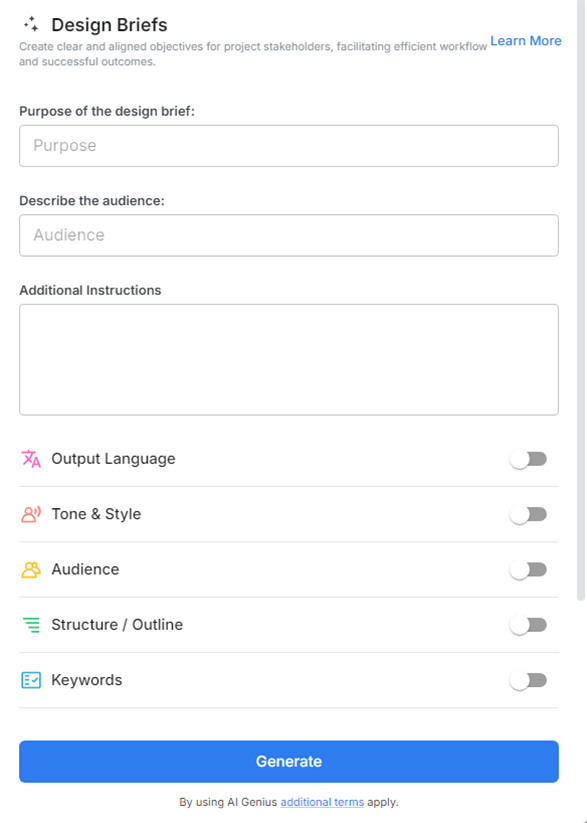
1. Open a new document in Bit.ai.

2. Type @ on a blank line to open up the AI Writing Assistant.

3. Search Instagram Post Generator from the template search field on the left sidebar.

4. Fill out the quick Instagram Post Generator entry form, and Bit.ai will generate a customized post.

5. Add reference links, mood boards, and color preferences to guide designers visually.

6. Click 'Insert' to finalize the design brief, ready for sharing with your design team.
