


AI Customer Support Response
Deliver Stellar Support Responses That Delight Your Customers
In the fast-paced realm of customer service, timely and thoughtful communication is the key to winning hearts and minds. With customers expecting swift, accurate responses, it’s crucial to stay ahead of the curve without sacrificing quality.
Are you finding it hard to keep up with the influx of customer inquiries? Meet Bit.ai’s Customer Support Response Generator—a delightful tool that takes the hassle out of crafting thoughtful replies. Let’s explore this fantastic tool, why you should embrace it, and how Bit.ai makes your customer service process a breeze!
What is a Customer Support Response Generator?
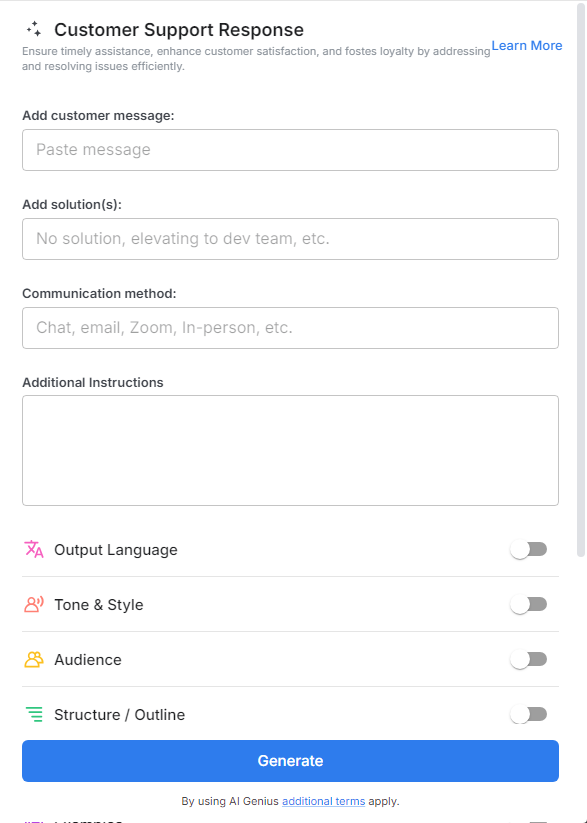
Imagine having a personal advisor who knows how to guide you to respond to every customer inquiry perfectly! The Customer Support Response Generator is exactly that! It’s an intuitive tool that helps you create tailored responses that sound friendly, professional, and prompt, ensuring your customers feel valued and heard.
Why Use a Customer Support Response Generator?
- Time Saver: Whip up responses in seconds, allowing you to address customer queries without wasting precious time—perfect for busy teams!
- Consistency Champion: Keep your tone and messaging uniform across all interactions with templates that ensure your brand voice remains strong and cohesive.
- Creativity Booster: Feeling uninspired? This generator provides a plethora of response options to spark your creativity, helping you find the right words every time!
- No Customer Service Experience Needed: Whether you’re a seasoned pro or new to the game, this tool ensures that anyone can provide exceptional support without prior experience.
- Versatile & Adaptive: From inquiries about product features to resolving complaints, the generator adjusts to fit any customer interaction seamlessly.
Why Use Bit.ai to Generate Customer Support Responses?
With Bit.ai’s Customer Support Response Generator, you can elevate your customer service game effortlessly. Here’s how this gem can enhance your support experience like never before!
- Swift & Thoughtful Replies: Generate timely and personalized responses that delight your customers and keep them engaged, all while minimizing your workload.
- Speak Their Language: Customize responses to fit the customer’s needs, ensuring your communication resonates with diverse audiences and enhances understanding.
- Keyword Optimization: Include relevant keywords in your responses, boosting clarity and helping customers find exactly what they need.
- Your Brand’s Voice: Bit.ai allows you to maintain your unique tone and style, so your responses sound like they’re coming straight from your brand, not a robot!
- Audience-Focused: Tailor your responses based on customer preferences, ensuring your communication meets their expectations and builds loyalty.
- Collaborative Features: Work with your support team to brainstorm and refine responses, turning customer interactions into collaborative experiences that enhance service quality.
- Organized Workflows: Keep all your customer interactions in one place with Bit.ai’s document collaboration platform, making it easy to reference past inquiries and solutions.
How To Use Bit.ai Customer Support Response Generator
1. Open a new document in Bit.ai.

2. Type @ on a blank line to open up the AI Writing Assistant.

3. Search Instagram Post Generator from the template search field on the left sidebar.

4. Fill out the quick Instagram Post Generator entry form, and Bit.ai will generate a customized post.

5. Personalize your chapter by clicking on ‘Advanced Options’ to add your flair or adjust the style.

6. When you’re satisfied, hit ‘Insert,’ and it’ll be added to your Bit document for easy access.
