


AI Customer Service Script
Create Consistent, Friendly, and Efficient Customer Interactions
A well-prepared customer service script is an essential tool for any business that values consistent and efficient communication with customers. Scripts help team members handle a wide range of inquiries—from resolving complaints to offering product guidance—with clarity and professionalism. However, creating a customer service script that’s both effective and customizable can be challenging. Bit.ai’s Customer Service Script simplifies this process, enabling you to craft polished scripts that empower your team to engage confidently with customers.
With Bit.ai’s Customer Service Script template, you can create scripts tailored to different scenarios, ensuring your team is prepared for anything that comes their way. From handling tough conversations to delivering helpful information, Bit.ai makes it easy to create a resource that supports smooth and positive customer interactions.
What is a Customer Service Script?
A customer service script is a written guide that provides customer service representatives with a consistent approach for handling customer interactions. Key elements in an effective customer service script include greeting and introduction, which offer guidelines for friendly, professional greetings that set a positive tone for the conversation. The script also includes understanding the customer’s issue, with prompts for asking the right questions to get to the root of the problem.
Why Use Bit.ai for Your Customer Service Script?
Bit.ai’s Customer Service Script Tool provides the structure, features, and flexibility to create professional, comprehensive scripts for any customer interaction. Here’s how Bit.ai can help you build an effective customer service script:
- Customizable Templates: Bit.ai offers pre-built templates for different service scenarios, so you can start with a framework and adapt it to match your brand’s voice and customer needs.
- Real-Time Collaboration: Collaborate with team members to create or edit scripts in real-time, ensuring input from all relevant departments. This feature allows managers, customer service reps, and product specialists to contribute directly.
- Scenario-Based Scripts: Organize scripts based on common scenarios, such as handling complaints, assisting with product inquiries, or guiding through returns, making it easy for reps to find the right language for any situation.
- Interactive Prompts: Add interactive prompts for reps to ask clarifying questions or suggest follow-up actions, helping them lead productive and customer-centered conversations.
- Multi-Language Support: Bit.ai makes it easy to create scripts in multiple languages, which is essential for businesses that serve diverse customer bases.
- Policy and Protocol Integration: Link relevant policies or protocols within the script so reps can refer to them quickly when needed, ensuring every interaction aligns with company guidelines.
- Mobile Accessibility: Bit.ai’s mobile compatibility allows reps to access scripts on the go, ensuring they can deliver high-quality service from anywhere.
How to Use Bit.ai’s Customer Service Script
1. Open a new document in Bit.ai.

2. Type @ on a blank line to open up the AI Writing Assistant.


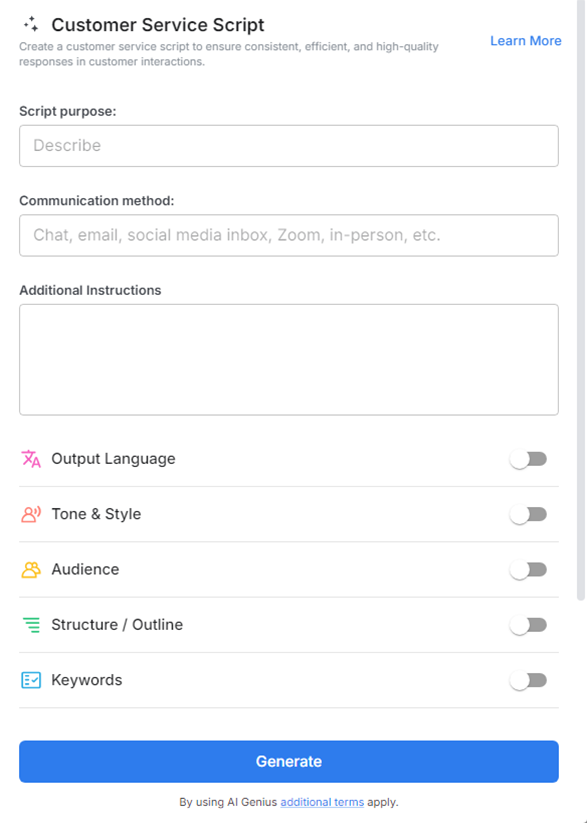
4. Fill out the quick Instagram Post Generator entry form, and Bit.ai will generate a customized post.

5. Personalize the script by clicking on 'Advanced Options' to adjust the tone, style, or content to better fit your customer service approach.

6. Once you're done, click 'Insert,' and the customer service script will be added to your Bit document.
