


AI Crisis Communication Plan
Create a Robust Plan for Managing Crises with Clear Communication
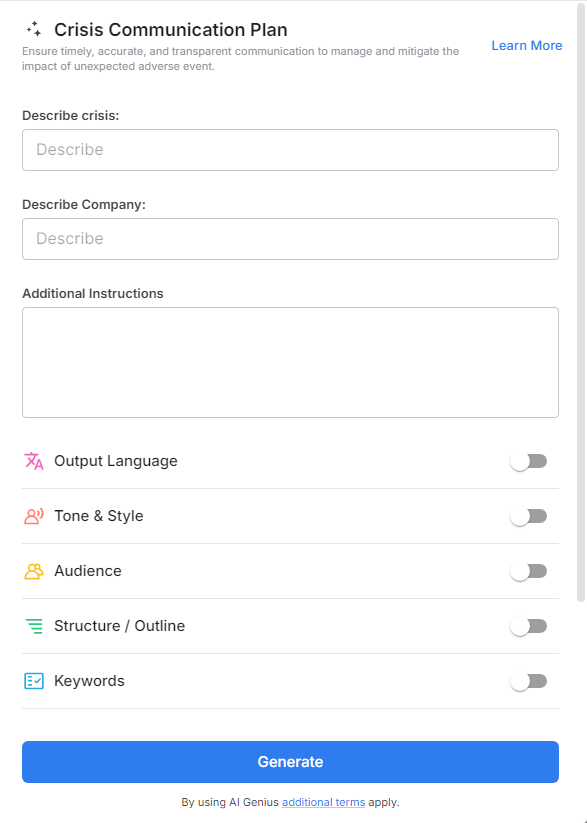
When a crisis strikes, how you communicate can make or break your organization's reputation. Whether it’s a public relations disaster, an internal issue, or a natural disaster, having a clear, structured crisis communication plan in place is critical. Bit.ai’s Crisis Communication Plan tool helps you create a detailed, effective strategy that ensures you’re ready to respond to any emergency with clear, consistent messaging.
Let’s dive into how Bit.ai can help you navigate the complexities of crisis communication and keep your organization prepared for the unexpected.
What is a Crisis Communication Plan?
A Crisis Communication Plan outlines the steps and processes an organization follows when a crisis arises. It includes strategies for managing communication internally and externally, identifying key stakeholders, and ensuring that the right messages are delivered at the right time. A good plan helps minimize confusion, protect the organization’s reputation, and ensure that all involved parties are informed and aligned.
Why Use a Crisis Communication Plan Tool?
- Clarity in Chaos: Bit.ai ensures that your plan is clear, concise, and comprehensive—helping you stay focused during a crisis, no matter how chaotic things get.
- Time-Saving: Crisis situations require quick responses. Bit.ai accelerates the process of creating a crisis communication plan, so you can act fast and efficiently.
- Customizable Plans: Every crisis is different. Bit.ai gives you the flexibility to tailor your plan for various situations, from corporate scandals to natural disasters, ensuring that your responses are relevant and effective.
- Proactive Preparedness: Bit.ai encourages you to think ahead and outline specific steps for common crisis scenarios, helping you avoid scrambling when a crisis hits.
- Team Collaboration: Bit.ai’s real-time collaboration tools make it easy for your team to work together and update the plan as needed, ensuring everyone is on the same page.
Why Use Bit.ai for Your Crisis Communication Plan?
Bit.ai’s Crisis Communication Plan tool doesn’t just help you create a plan—it ensures that your plan is thoughtful, thorough, and built for quick action. Here’s why it’s the best choice for crisis preparedness:
- Step-by-Step Guidance: Bit.ai’s tool offers templates and clear instructions to help you build a crisis communication plan from the ground up, making the process easy to follow.
- Comprehensive Coverage: From defining the crisis to identifying key audiences, crafting messages, and outlining response timelines, Bit.ai covers all the necessary components of an effective crisis communication plan.
- Smart Response Templates: Bit.ai’s smart templates guide you through different types of crisis situations, ensuring your response is appropriate and effective for each unique scenario.
- Real-Time Updates: Crises evolve rapidly, and Bit.ai ensures your communication plan remains up-to-date, helping you adjust your strategy as new information becomes available.
- Data-Driven Insights: Bit.ai uses data to suggest best practices for crisis communication, allowing you to make informed decisions when responding to a crisis.
How to Use Bit.ai’s Crisis Communication Plan
1. Open a new document in Bit.ai.

2. Type @ on a blank line to open up the AI Writing Assistant.


4. Fill out the quick Instagram Post Generator entry form, and Bit.ai will generate a customized post.

5. Personalize it by clicking on 'Advanced Options' to add your unique voice or tweak the style to match your brand.

6. Once you're done, click 'Insert,' and it'll be added to your Bit document.
