


AI Course Syllabus
Wave Goodbye to Confusing Syllabi and Hello to Clear, Engaging Course Plans!
Creating a course syllabus that’s organized, clear, and engaging doesn’t have to feel overwhelming. Say goodbye to complex formatting and scattered information, and say hello to streamlined, interactive course outlines with Bit.ai’s Course Syllabus! With this tool, your syllabus can become a dynamic guide that sets the stage for learning, helping students understand course expectations and stay on track throughout the semester.
Ready to make your syllabus a powerful resource? Let’s dive into how Bit.ai’s Course Syllabus simplifies the creation process from start to finish!
What is the Course Syllabus?
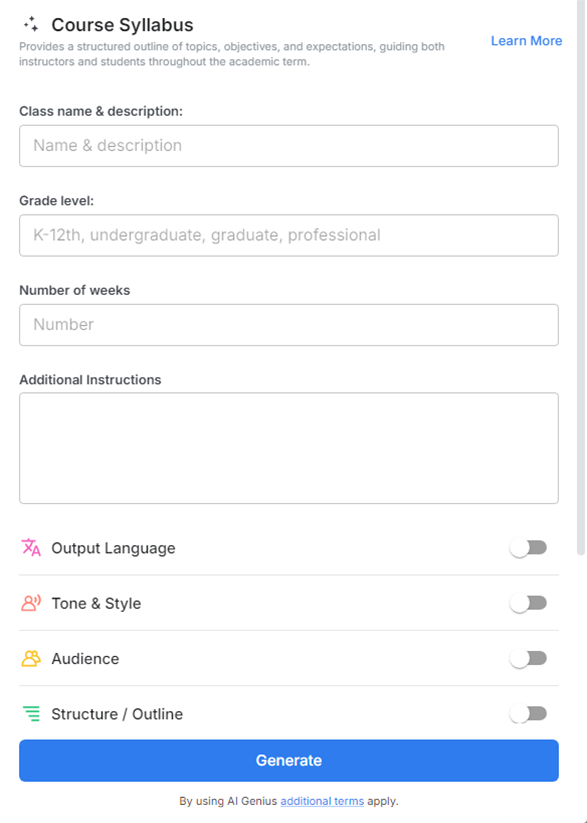
Think of it as your syllabus assistant! The Course Syllabus allows you to effortlessly organize course information, schedules, and resources, so your students can easily access and understand everything they need to succeed. From objectives to assignments to grading policies, Bit.ai’s tool keeps all course details clear, concise, and visually appealing.
Why Use the Course Syllabus?
- Simple, Intuitive Layout: Present course details in a clear and organized structure, making it easy for students to navigate from the start.
- Interactive Content: Embed links, videos, readings, and resources directly into the syllabus, allowing students to engage with materials in one place.
- Consistent Formatting: Create polished syllabi with a professional look that aligns with your institution’s standards.
- Time-Saving Templates: Start with ready-to-use syllabus templates that streamline the setup process and reduce formatting time.
- Centralized Course Information: Keep all critical course details in one accessible document, eliminating confusion and ensuring students always have the latest version.
Why Use Bit.ai for Your Course Syllabus?
Bit.ai’s Course Syllabus doesn’t just help you create a syllabus; it transforms how you share and manage course information. Here’s why it’s the ideal for instructors:
- Real-Time Collaboration with Colleagues: Bit.ai allows you to collaborate with teaching assistants or co-instructors, letting everyone contribute and refine the syllabus in real-time.
- Customizable Design Options: With Bit.ai, you can personalize the syllabus design to reflect your teaching style or course theme, making it visually engaging and memorable.
- Version Control for Easy Updates: Easily make updates or adjustments throughout the semester, with version control ensuring students always see the latest information.
- Progress Tracking and Milestones: Add milestones and track important deadlines, making it easier for students to follow course progression and manage their time.
- Access Control for Privacy: Share your syllabus with specific groups, ensuring only enrolled students and relevant staff have access to course materials.
- AI-Powered Prompt Library: Get inspiration for course descriptions, objectives, or learning outcomes with Bit.ai’s AI-powered prompt library, helping you refine your syllabus language and align it with academic standards.
How to Use Bit.ai’s Course Syllabus
1. Open a new document in Bit.ai.

2. Type @ on a blank line to open up the AI Writing Assistant.

3. Search Instagram Post Generator from the template search field on the left sidebar.

4. Fill out the quick Instagram Post Generator entry form, and Bit.ai will generate a customized post.

5. Personalize your syllabus using ‘Advanced Options’ to ensure it reflects your teaching approach.

6. Once you're done, click 'Insert,' and it'll be added to your Bit document.
