


AI Conference Papers
Bring Academic Ideas to Life with Clarity and Precision
Writing a conference paper is a significant task that requires clarity, structure, and attention to detail. Whether you’re presenting at a research symposium, academic conference, or industry event, your paper needs to make an impact. But crafting a conference paper that meets all the requirements while being engaging and informative can be overwhelming. That’s where Bit.ai’s Conference Papers comes in!
Bit.ai’s Conference Paper Tool helps you create well-organized, professionally written papers quickly and efficiently. From outlining your key points to drafting and finalizing your content, Bit.ai makes sure your conference paper stands out for all the right reasons. Let’s dive into how Bit.ai’s Conference Papers can simplify the writing process and help you present your research like a pro!
What is a Conference Paper?
A conference paper is a written document that is submitted to an academic or professional conference. It typically summarizes research findings, discusses a specific topic, or presents an analysis of an issue relevant to the conference theme. Conference papers can vary widely in length and format, but they all share the goal of presenting clear, insightful, and original content that contributes to the discussion at the conference.
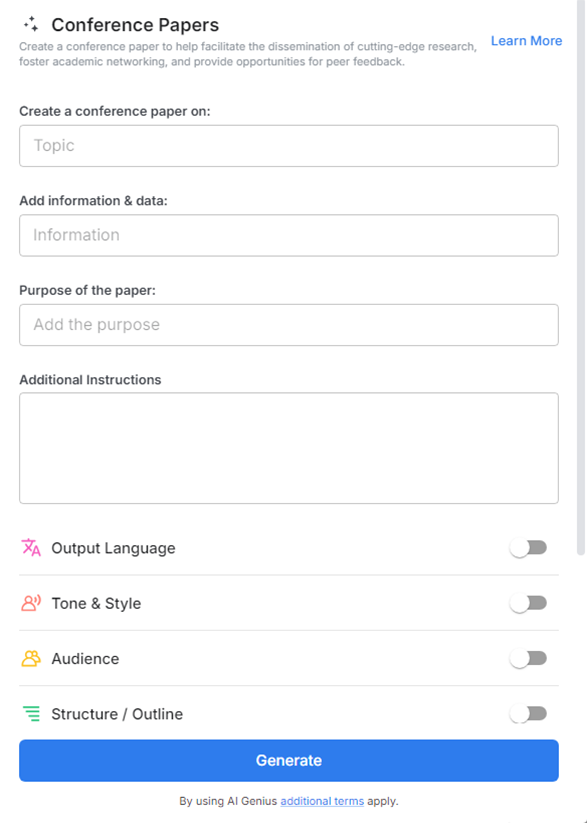
Why Use Conference Paper?
- Streamlined Process: Helps structure your paper, guiding you through the process of writing from start to finish. You’ll never lose track of key elements again.
- Save Time: Say goodbye to writer’s block! Quickly draft sections, outline key ideas, and organize your research without the pressure of starting from scratch.
- Structure & Format: Ensures that your paper follows a clear and logical structure. You’ll never miss a crucial section—your introduction, methodology, results, and conclusion will be laid out just right.
- Collaboration: If you’re working with co-authors, the collaborative features allow you to seamlessly work together in real-time, making it easy to brainstorm, edit, and finalize your paper as a team.
- Consistency & Professionalism: Formatting tools help your paper maintain a consistent style, making it look polished and professional from start to finish.
Why Use Bit.ai for Your Conference Paper?
Beyond simple text editing, it’s designed to streamline the process of writing, organizing, and formatting your conference paper with minimal effort. Here’s how you can create an outstanding paper:
- Templates for Success: Choose from pre-built templates that help you structure your paper according to academic or conference-specific guidelines. This eliminates the guesswork and ensures your paper meets all the formatting standards.
- Real-Time Collaboration: Invite collaborators to work on the paper with you. Allows multiple authors to edit the paper simultaneously, making it easy to get feedback and make changes on the go.
- Efficient Outlining: Organize your thoughts and research findings with an easy-to-use outline. Helps you structure your paper into clear sections, so you won’t miss any critical elements.
- Drafting Assistance: Not sure where to start? Helps you draft sections of your paper by offering suggestions for phrasing and content, letting you focus on refining your research rather than starting with a blank page.
- Referencing Tools: Citations are crucial in conference papers. Easily incorporate citations and references, so you don’t have to worry about formatting them manually.
- Professional Formatting: You don’t have to spend hours adjusting margins, fonts, or section headings. Automatically applies consistent formatting to your paper, ensuring it looks polished and academic.
How to Use Bit.ai’s Conference Paper
1. Open a new document in Bit.ai.

2. Type @ on a blank line to open up the AI Writing Assistant.


4. Fill out the quick Instagram Post Generator entry form, and Bit.ai will generate a customized post.

5. Personalize it by clicking on 'Advanced Options' to adjust the structure, tone, and formatting according to conference guidelines or specific preferences.

6. Once you're done, click 'Insert,' and the conference paper will be added to your Bit document.
