


AI Chapter Generator
Create Engaging Chapters That Captivate Your Readers
Modern writers need modern solutions, right! Making your chapters shine is key to keeping your readers hooked. Whether you’re a novelist, blogger, or content creator, you know how important it is to structure your writing in a way that flows and excites.
Are your chapters falling flat? With Bit.ai’s Chapter Generator, you can craft captivating chapters that draw your audience in without the headache of staring at a blank page for hours. Let’s dive into the wonders of this amazing tool, why you should embrace it, and how Bit.ai makes the chapter-writing process as easy as pie!
What is a Chapter Generator?
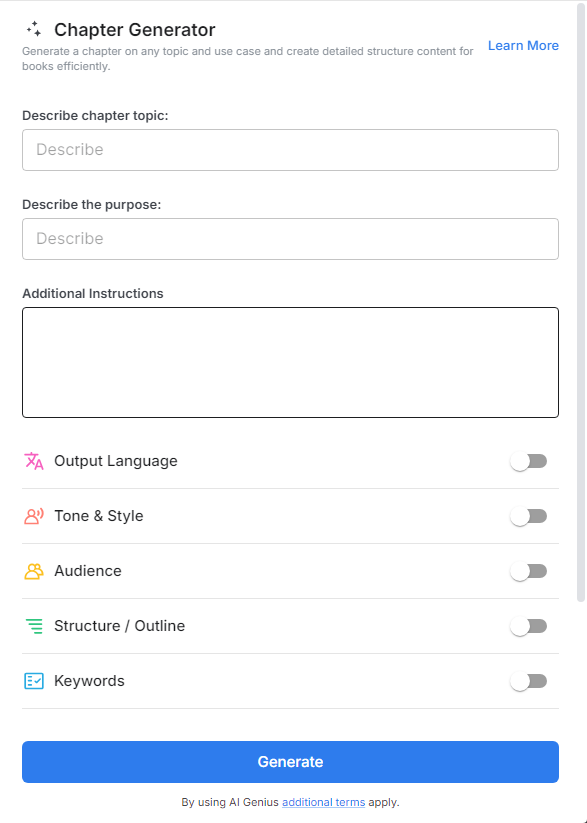
Think of a Chapter Generator as your writing partner who’s always ready with fresh ideas. It’s a fun, user-friendly tool designed to help you structure and develop your chapters effortlessly. With a variety of templates and suggestions, it transforms your writing process from daunting to delightful, allowing your creativity to flow without limits!
Why Use a Chapter Generator?
- Time Saver: Craft compelling chapters quickly—this generator gets you writing faster, so you can focus on your narrative without getting bogged down.
- Inspiration Hub: Hitting a creative wall? The Chapter Generator serves up a buffet of ideas and outlines to reignite your imagination just when you need it most!
- Cohesive Storytelling: Maintain a consistent tone and style throughout your work with structured templates that keep your writing polished and professional.
- No Writing Expertise Required: With intuitive tools, anyone—from budding writers to seasoned pros—can create engaging chapters without needing a degree in creative writing!
- Versatile & Customizable: Whether you’re drafting a suspenseful thriller or a heartwarming romance, the Chapter Generator adapts to fit any genre or narrative style.
Why Use Bit.ai to Generate Chapters?
With Bit.ai’s clever Chapter Generator, you can whip up compelling chapter outlines and engaging content in a flash, transforming your writing journey without the stress of endless brainstorming. Here’s how this little treasure can elevate your writing game like never before!
- Create Chapters with Ease: Imagine being able to come up with exciting chapter ideas in just a few minutes. With Bit.ai, it’s as easy as pie! You can focus on what you love—telling your story—while the tool helps organize your thoughts. Say goodbye to staring at a blank page and hello to a smooth, fun writing experience!
- Speak Your Readers’ Language: Knowing your audience is key to good storytelling. Bit.ai lets with it's multi-language support you customize your chapters so they really connect with your readers. When your writing resonates with what they enjoy, they’re more likely to feel engaged and eager to read more of your work.
- Help Readers Find You: Want your writing to catch more eyes? Bit.ai helps you include important keywords in your chapters that make it easier for readers to discover your work. This means more people will come across your writing and have a chance to enjoy your stories.
- Show Off Your Unique Style: Every writer has their own voice, and Bit.ai makes it easy to let yours shine. Whether you prefer a serious tone or a playful one, this tool helps you express your personality in every chapter. Your writing will stay true to who you are while still being organized and clear.
- Write with Your Audience in Mind: Good stories connect with readers on a personal level. Bit.ai encourages you to think about who your readers are and what they like. By doing this, you can create chapters that grab their attention and keep them coming back for more.
- Collaborate for Creative Fun: Writing doesn’t have to be a solo adventure! With Bit.ai, you can invite friends or fellow writers to join in the brainstorming and chapter creation. It’s like having a fun brainstorming session where everyone shares ideas, making your story even better.
- Keep Your Ideas Organized: Trying to remember all your ideas can be tricky, but Bit.ai helps you keep everything neat and tidy. You can store all your chapter outlines and notes in one place, making it super easy to find and build upon your creative thoughts whenever you need to.
How To Use Bit.ai Chapter Generator
1. Open a new document in Bit.ai.

2. Type @ on a blank line to open up the AI Writing Assistant.


4. Fill out the quick Instagram Post Generator entry form, and Bit.ai will generate a customized post.

5. Personalize your chapter by clicking on ‘Advanced Options’ to add your flair or adjust the style.

6. When you’re satisfied, hit ‘Insert,’ and it’ll be added to your Bit document for easy access.
