


AI Blog Outline Generator
Map Out Your Blog in Minutes—Without the Brain Freeze!
So, you’ve got a great blog idea, but now you’re staring at a blank screen wondering where to start. Don’t worry—Bit. Ai’s Blog Outline Generator is like a GPS for your thoughts! This tool helps you map out your blog structure in seconds, giving you a crystal-clear roadmap for turning your ideas into a masterpiece.
Ready to get organized and skip the mental gymnastics? Let’s see how Bit.ai’s Blog Outline Generator takes your blog from chaos to clarity—fast!
What is a Blog Outline Generator?
A Blog Outline Generator is your backstage pass to structured writing. It’s an AI tool that helps you break down your blog into bite-sized, easy-to-tackle sections. Think of it as your blog’s skeleton—minus the creepy Halloween vibes. You tell it the topic, and the generator spits out a clear, step-by-step outline, so you can focus on the fun part: writing!
Why Use a Blog Outline Generator?
- Brainstorming Buddy: Outlining can be a pain, but this tool gives you a solid framework to start with, so your ideas don’t wander off like a lost puppy.
- Save Time, Save Sanity: Why waste time outlining when the generator can do it in seconds? More time for snacks, less time for stress!
- Stay On Track: Keep your blog organized and logical with a well-structured outline that makes writing a breeze.
- Perfect for Planner Lovers: If you like to plan things down to the last detail, this tool is your BFF. Get that blog in shape before you even start writing!
- Flexible and Adaptable: Whether you’re crafting a how-to guide or a deep dive into quantum physics (fancy!), the Blog Outline Generator can handle any topic.
Why Use Bit.ai to Generate Blog Outlines?
Bit.ai’s Blog Outline Generator is like having a personal assistant who can read your mind (but, you know, less creepy). It’s designed to help you get organized in a fun and efficient way, so your blog practically writes itself. Let’s break down why you’ll love it:
- Instant Outlines: Get a complete blog outline in seconds. Just input your topic, and Bit.ai will create a clear and concise roadmap.
- Customizable Structure: Want to tweak the outline? No problem! Adjust the sections and subheadings to fit your unique voice and vision.
- SEO-Ready: Bit.ai includes SEO-friendly keywords in the outline, making sure your blog is optimized from the get-go. So, not only is it organized—it’s also searchable!
- Organization Galore: Bit.ai keeps your outlines, drafts, and finished blogs all neatly organized in one place. No more digging through endless files like a digital archaeologist.
- Cross-Team Collaboration: Got a big post or campaign that needs input from various departments? Bit.ai’s collaboration tools allow multiple team members to contribute, give feedback, and fine-tune content in real-time.
- Formatting Automation: Bit.ai’s Blog Post Generator doesn’t just stop at content creation—it also helps format your blog with headers, subheadings, lists, and more to ensure it’s polished and professional.
- Version History: Worried about losing a great idea? Bit.ai saves all revisions, so you can track changes and even revert to previous drafts if needed, giving you full control over your content.
How to Use Bit.ai’s Blog Outline Generator
1. Open a new document in Bit.ai.

2. Type @ on a blank line to open up the AI Writing Assistant.


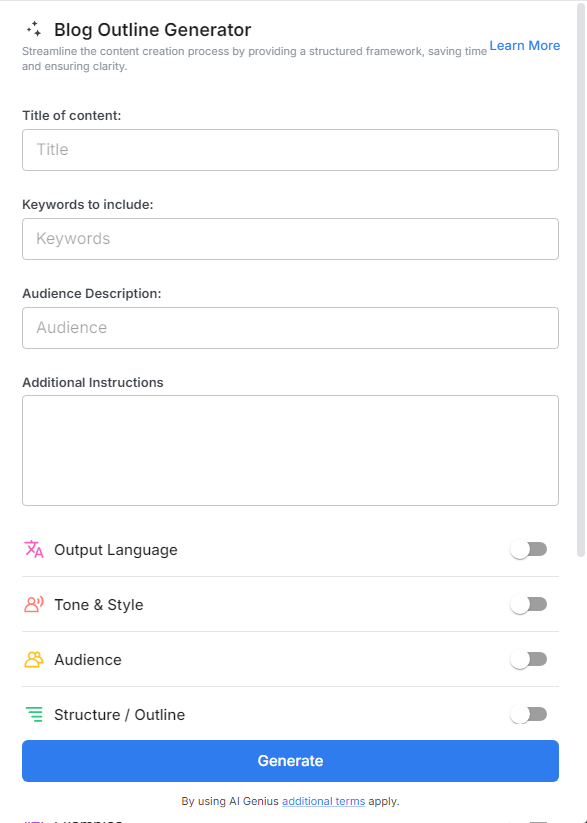
4. Fill out the quick Instagram Post Generator entry form, and Bit.ai will generate a customized post.

5. Personalize it by clicking on 'Advanced Options' to add your unique voice or tweak the style to match your brand.

6. Once you're done, click 'Insert,' and it'll be added to your Bit document.
