


AI Addressing Pain Points via Email
Connect with Your Audience Through Empathy and Solutions
Reaching out to clients or customers through email is about more than making a pitch; it’s about addressing real challenges they face. Addressing pain points in your emails builds trust, engages the reader, and makes your message impactful. But crafting emails that resonate can be time-consuming. Enter Bit.ai’s feature for Addressing Pain Points via Email—your shortcut to creating professional, empathetic emails that speak to your audience’s needs effortlessly!
Bit.ai empowers you to assemble, personalize, and share emails that don’t just get read—they inspire action. By identifying pain points and offering targeted solutions, your emails become powerful tools for conversion. Let’s take a closer look at how Bit.ai’s Email Tool can help you address pain points effectively.
What is Addressing Pain Points via Email?
Addressing pain points via email involves identifying your reader’s challenges and offering empathetic, actionable solutions. Key elements include identifying key issues, where you recognize the frustrations or challenges your audience is facing.
Why Addressing Pain Points via Email?
- Builds Trust – Showing empathy toward your audience’s struggles builds credibility and rapport.
- Increases Engagement – Emails that address readers’ needs directly tend to receive higher open and response rates.
- Boosts Conversions – By presenting a clear solution, you’re more likely to encourage action and build long-term customer relationships.
Why Use Bit.ai for Addressing Pain Points via Email?
Bit.ai’s feature makes it easy to create empathetic, solution-oriented emails that engage and convert. Here’s how:
- Customizable Templates – Bit.ai provides templates tailored for addressing common pain points, so you can focus on the content rather than formatting.
- Drag-and-Drop Functionality – Easily add visuals, links, and personal touches with Bit.ai’s intuitive drag-and-drop editor. No design experience needed!
- Real-Time Collaboration – Working with a team? Bit.ai lets everyone contribute and edit simultaneously, gathering input and finalizing emails faster.
- Personalization Options – Customize your emails with specific language, references, and details that speak directly to individual pain points.
- Trackable Engagement – Bit.ai offers engagement tracking, so you can see how readers respond and refine your email strategy accordingly.
How to Use Bit.ai for Addressing Pain Points Via Email
1. Open a new document in Bit.ai.

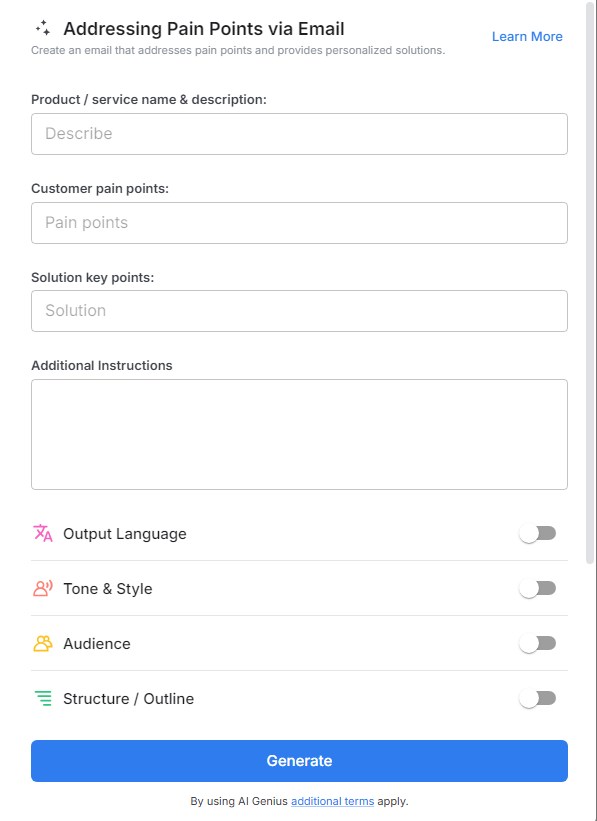
2. Type @ on a blank line to open up the AI Writing Assistant.


4. Fill out the quick Instagram Post Generator entry form, and Bit.ai will generate a customized post.

5. Personalize the email by clicking on 'Advanced Options' to adjust the tone, style, or content to match your brand's voice.

6. Once you're done, click 'Insert,' and the email will be added to your Bit document.
