


AI Frequently Asked Questions
Answer Questions Before They’re Even Asked
In every industry, customers, clients, and even team members often have the same recurring questions. Having clear, well-organized FAQs not only saves time but also builds trust, reduces confusion, and enhances the user experience.
Feeling bogged down answering the same queries again and again? With Bit.ai’s Frequently Asked Questions Generator, you can create polished, informative FAQs in a snap—making support easier and communication smoother.
So, let’s explore this fantastic Frequently Asked Questions Generator tool, why you should embrace it, and how Bit.ai makes the process a breeze!
What is a Frequently Asked Questions Generator?
A Frequently Asked Questions Generator is like your brand’s go-to knowledge base creator—an AI-powered tool that helps you quickly compile common questions and provide helpful answers. Whether you’re creating an FAQ page for a website, product, or internal team, it’s the simplest way to communicate clearly.
Why Use a Frequently Asked Questions Generator?
- Time Saver: No need to start from scratch—auto-generate FAQs based on your product, service, or audience.
- Clarity for Everyone: Answer common queries upfront and prevent miscommunication or repeated support tickets.
- Boosts Credibility: A well-crafted FAQ section positions your brand as thoughtful, prepared, and professional.
- User Experience Gold: Make it easy for users or customers to find the info they need without reaching out.
- Customizable & Flexible: Tailor your FAQ sections to fit different platforms, audiences, or team workflows.
Why Use Bit.ai to Generate FAQs?
This smart tool helps you craft informative, well-organized FAQs for any context—fast. Whether it’s for your website, onboarding docs, or product launch, Bit.ai makes sure your FAQs are always on point.
- Instant Generation: Simply describe your product or topic, and Bit.ai will suggest commonly asked questions and answers.
- Tone Matching: From professional to casual, tailor the language of your FAQs to match your brand voice perfectly.
- Collaborative Editing: Invite your team to review, refine, or add their own insights in real time.
- Multi-Format Ready: Use the FAQs across websites, PDFs, presentations, internal wikis, and more.
- Organized Output: Easily categorize questions and keep everything searchable within your Bit.ai workspace.
- Editable Templates: Choose from various layouts and formats that suit your use case—no design skills needed!
How to Use Bit.ai’s Frequently Asked Questions
1. Open a new document in Bit.ai.

2. Type @ on a blank line to open up the AI Writing Assistant.


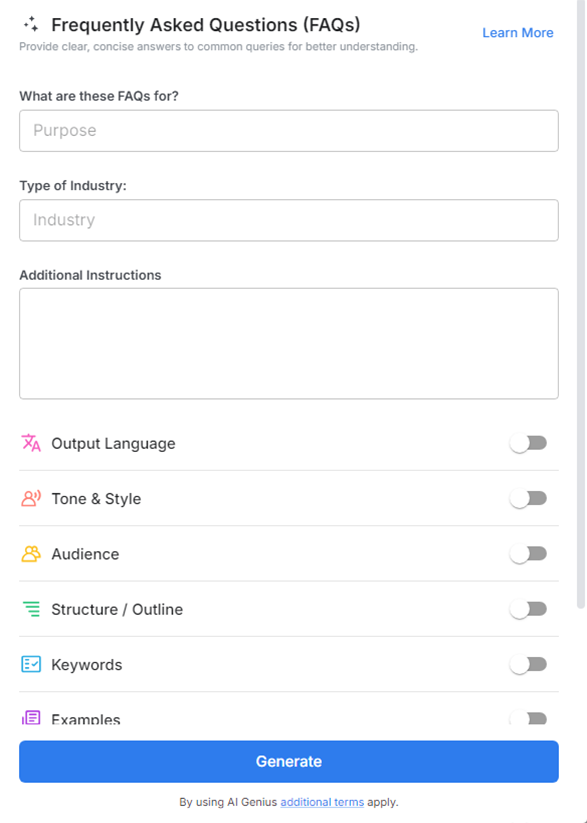
4. Fill out the quick Instagram Post Generator entry form, and Bit.ai will generate a customized post.

5. Personalize the output by clicking on ‘Advanced Options’ to edit tone, question formats, or grouping.

6. Once you’re done, click ‘Insert,’ and it’ll be added to your Bit document.
