


AI Expense Tracker
Stay on Top of Your Finances with Smart Expense Tracking
In both personal and professional life, financial clarity is key. Whether you’re managing your own spending or tracking team budgets, keeping tabs on expenses can help you make smarter decisions and avoid costly surprises.
Overwhelmed with receipts, spreadsheets, and scattered budgets? With Bit.ai’s Expense Tracker, you can effortlessly monitor and organize expenses—all in one streamlined platform that keeps everything neat, accessible, and actionable.
So, let’s explore this fantastic Expense Tracker tool, why you should embrace it, and how Bit.ai makes the process a breeze!
What is an Expense Tracker?
An Expense Tracker is like having your own digital accountant—an intuitive tool that helps you record, categorize, and analyze spending patterns in real time. Whether you’re tracking office supplies, travel costs, or recurring subscriptions, it’s all about clarity and control.
Why Use an Expense Tracker?
- Time Saver: Quickly log expenses on the go, no more end-of-month panic or manual reconciliation.
- Total Transparency: Get a clear picture of where your money is going at any time.
- Smart Budgeting: Set spending limits, monitor progress, and stay aligned with your financial goals.
- Error Reduction: Automate calculations and minimize the risk of manual entry mistakes.
- Scalable & Customizable: Whether you’re a freelancer, startup, or growing business, it scales with your needs.
Why Use Bit.ai to Track Expenses?
This powerful tool lets you manage your finances efficiently and collaboratively, without the fuss of juggling multiple apps. Here’s why Bit.ai makes expense tracking simple and effective:
- Intuitive Templates: Use built-in templates to start tracking expenses immediately—no setup stress.
- Real-Time Collaboration: Work with your team or accountant to log and manage expenses together.
- Custom Categories: Create and edit expense categories that suit your specific personal or business needs.
- Visual Reporting: Generate visually appealing summaries and breakdowns to spot trends and make informed decisions.
- Cloud-Based Records: All your financial logs are stored securely and can be accessed from anywhere, anytime.
- Organized Documentation: Keep receipts, invoices, and notes attached to your entries within a single document.
How to Use Bit.ai’s Expense Tracker
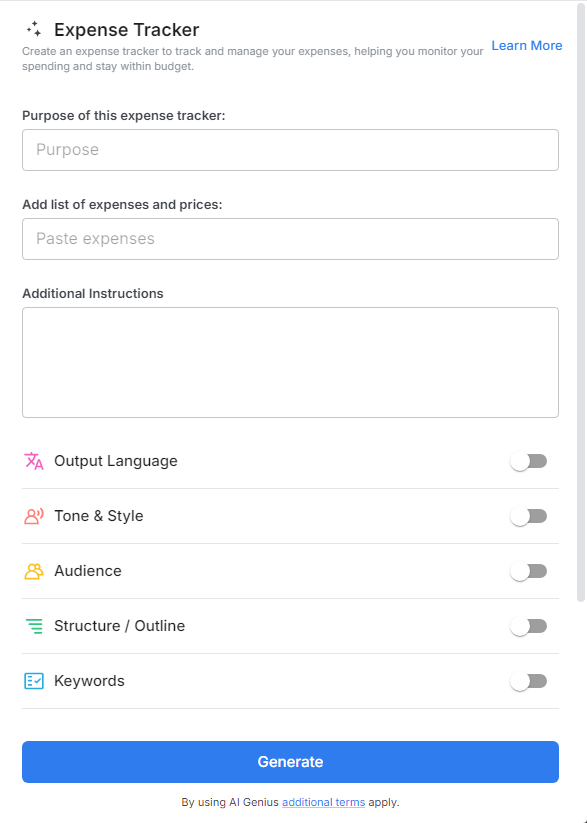
1. Open a new document in Bit.ai.

2. Type @ on a blank line to open up the AI Writing Assistant.


4. Fill out the quick Instagram Post Generator entry form, and Bit.ai will generate a customized post.

5. Personalize it by clicking on ‘Advanced Options’ to categorize, filter, and format according to your preferences.

6. Once you’re done, click ‘Insert,’ and it’ll be added to your Bit document.
