FREE TEMPLATES
Best YouTube Channel Growth Tracker Template
Track your YouTube channel’s growth, monitor key performance metrics, and identify content trends with this free, customizable YouTube Channel Growth Tracker Template. Use it to record subscribers, views, watch time, engagement, video performance, and growth over time.


What Is a YouTube Channel Growth Tracker Template?
A YouTube Channel Growth Tracker Template is a structured document used to monitor and organize the key metrics that show how a YouTube channel is performing over time. It helps creators track subscribers, views, watch time, engagement, and individual video performance over time.
By keeping these metrics and growth targets organized in one place, the template makes it easier to spot performance trends, compare videos, measure progress, and make more informed content decisions.
Why Do You Need a YouTube Channel Growth Tracker Template?
A YouTube growth tracker helps creators:
- Monitor subscriber and view growth
- Track video performance over time
- Identify high-performing content
- Monitor watch time and engagement
- Compare video results
- Track progress toward channel growth goals
- Spot changes in content performance
- Keep performance data organized
- Make content planning more data-driven
What Should a YouTube Channel Growth Tracker Template Include?
A YouTube Channel Growth Tracker Template should include the key information needed to monitor channel performance, analyze content, understand audience trends, and set measurable growth goals.
Key sections included in this YouTube Channel Growth Tracker Template are:
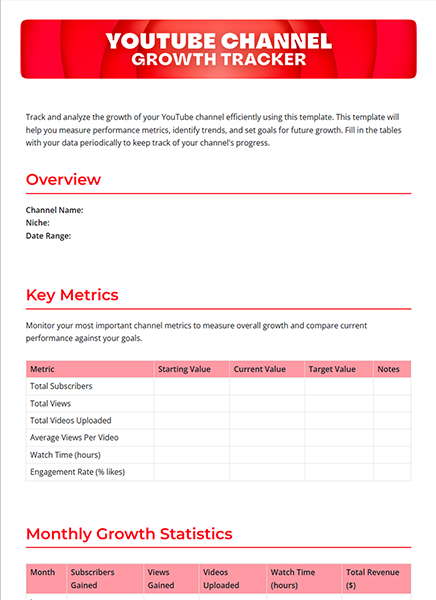
- Channel Overview: Records basic channel details such as the channel name, niche, and tracking period.
- Key Metrics: Tracks important YouTube analytics such as subscribers, views, videos uploaded, average views per video, watch time, and engagement rate.
- Monthly Growth Statistics: Monitors month-by-month changes in subscribers, views, videos published, watch time, and revenue.
- Content Performance Analysis: Evaluates individual videos based on views, likes, comments, watch time, click-through rate (CTR), and other performance notes.
- Audience Demographics: Tracks audience characteristics such as age, gender, and other available demographic insights, along with changes over time.
- Traffic Source Breakdown: Shows where video views are coming from, including YouTube Search, Suggested Videos, external sources, and playlists.
- Goal Setting: Defines specific YouTube channel growth goals, target dates, completion dates, and current status.
- Strategy Notes: Captures content ideas, engagement strategies, collaboration opportunities, and other actions that could support channel growth.
- Reflection and Future Plans: Records key performance observations, areas for improvement, and priorities for the next tracking period.
How to Use This YouTube Channel Growth Tracker Template?
Follow these simple steps to track and organize your YouTube channel growth in Bit.ai.
Step 1. Open the YouTube Channel Growth Tracker Template in Bit.ai.
Step 2. Add your channel details, tracking period, and growth goals.
Step 3. Record subscriber, view, watch time, and engagement metrics regularly.
Step 4. Add individual video performance data and note important trends or insights.
Step 5. Review the tracker regularly to monitor progress, identify trends, and guide future content planning.
Who Can Use This YouTube Channel Growth Tracker Template?
- YouTube creators
- Content creators
- YouTube marketers
- Social media managers
- Influencers
- Marketing agencies
- Brand teams
- Video production teams
Pro Tips for an Effective YouTube Channel Growth Tracker
Follow these practices to make your YouTube growth tracker clear, accurate, and useful:
- Track metrics consistently using the same time periods.
- Focus on metrics that align with your channel goals.
- Record video performance soon after publishing and during later reviews.
- Compare content performance to identify useful patterns.
- Keep growth goals specific and measurable.
- Add notes about major changes in content or performance.
- Review the tracker regularly and use the findings to guide future content.
Why Use Bit.ai for Your YouTube Channel Growth Tracker?
Bit.ai helps creators and marketing teams create, organize, and collaborate on YouTube growth trackers in a shared workspace. Keep channel metrics, video performance data, growth goals, and content insights organized while working together in real time.
With AI-powered writing, rich media embeds, and flexible sharing options, Bit.ai makes it easier to maintain, review, update, and share your YouTube growth tracker.
FAQ
Q1. What YouTube metrics should I track for channel growth?
Important metrics include subscribers, views, watch time, engagement rate, average views per video, CTR, and monthly growth. Tracking these metrics over time helps you identify changes in channel performance.
Q2. How do I use this YouTube Channel Growth Tracker Template?
Open the template in Bit.ai. Add your channel details and goals, record your key metrics, track individual video performance, and review the data regularly to monitor growth.
Q3. Can multiple team members collaborate on the tracker?
Yes. Bit.ai supports real-time collaboration, allowing creators, marketers, and other team members to update and review the tracker together.
Q4. Can I add supporting content to the tracker in Bit.ai?
Yes. Bit.ai lets you add rich content such as videos, files, spreadsheets, charts, and other relevant resources directly to your document, making supporting information easy to access alongside your growth data.
Q5. Can I share the YouTube Channel Growth Tracker with my team?
Yes. Bit.ai offers multiple sharing and permission options, allowing you to share the tracker with team members, collaborators, or other stakeholders based on the level of access they need.