FREE TEMPLATES
Best Time Blocking Planner Template
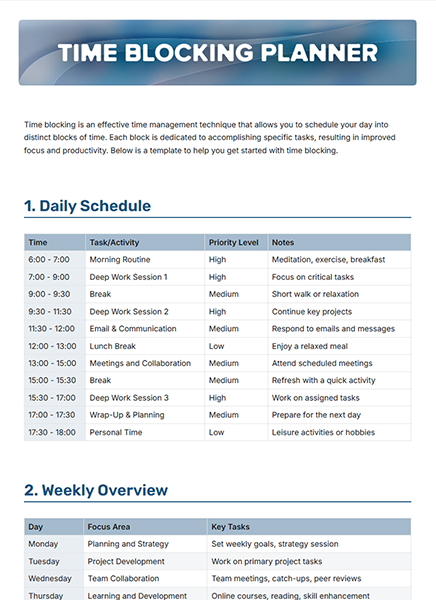
Plan your day, organize tasks, and protect time for focused work with this free, customizable Time Blocking Planner Template. Use it to schedule activities into dedicated time slots, manage competing priorities, and make better use of your working hours.


What is a Time Blocking Planner Template?
A Time Blocking Planner Template is a planning tool that divides your day into dedicated time blocks. Each block is assigned to a task, meeting, project, break, or personal activity.
Instead of relying on a long to-do list, time blocking helps you schedule specific tasks for specific times. This makes your day more organized, focused, and easier to manage while reducing distractions.
Why Do You Need a Time Blocking Planner Template?
A time blocking planner helps you manage your schedule with greater clarity. You can use it to:
- Organize daily tasks and appointments
- Set aside time for focused work
- Manage meetings and deadlines
- Reduce distractions and multitasking
- Balance focused work, routine tasks, and personal activities
- Schedule breaks and personal time
- Avoid overloading your calendar
What Should a Time Blocking Planner Include?
A useful time blocking planner should include the following details to help organize tasks and activities throughout the day.
- Date and day
- Main goals
- Priority tasks
- Time slots
- Task or activity
- Project or category
- Estimated duration
- Meeting schedule
- Breaks
- Personal activities
- Notes and adjustments
How to Use This Time Blocking Planner Template?
Follow these simple steps to plan and manage your time effectively in Bit.ai.
Step 1. Open the Time Blocking Planner Template in Bit.ai.
Step 2. List your tasks, meetings, priorities, and other activities for the day.
Step 3. Assign each activity to a specific time block based on priority and estimated duration.
Step 4. Include breaks, buffer time, and personal activities to create a realistic and manageable schedule.
Step 5. Review your schedule and adjust time blocks as needed throughout the day.
Who Can Use This Time Blocking Planner Template?
- Employees and freelancers
- Project and team managers
- Students and educators
- Entrepreneurs and business owners
- Remote and hybrid teams
- Marketing and operations teams
- Professionals managing busy schedules
- Anyone planning daily activities
Pro Tips for Using an Effective Time Blocking Planner
Follow these time blocking best practices to create a realistic schedule, stay focused, and make the most of your time.
- Schedule your most important tasks during your most productive hours.
- Leave extra time between tasks for unexpected work.
- Group similar activities into one time block.
- Avoid filling every minute of your day.
- Include short breaks to maintain focus.
- Keep meeting and deep-work blocks separate.
- Review your schedule regularly and adjust it as needed.
Why Use Bit.ai for Your Time Blocking Planner?
Bit.ai helps you create, organize, and share your time blocking planner in one collaborative workspace. Keep schedules, tasks, priorities, notes, and supporting resources together while collaborating in real time.
With AI-powered writing, smart document organization, and rich media embeds, Bit.ai makes time blocking planners easier to create, customize, share, and maintain.
FAQ
Q1. What is the difference between time blocking and a to-do list?
A to-do list records tasks that need to be completed, while time blocking assigns those tasks to specific time slots in your daily schedule. Time blocking helps you turn your task list into a structured daily schedule.
Q2. How do I use this Time Blocking Planner Template in Bit.ai?
Simply open the template in Bit.ai, add your tasks and activities, assign them to specific time blocks, and adjust your schedule as needed throughout the day.
Q3. Can I collaborate with others on a Time Blocking Planner in Bit.ai?
Yes. Bit.ai supports real-time collaboration, allowing team members to create, review, and update schedules together.
Q4. Can I add notes and supporting resources to my planner?
Yes, you can add notes, documents, links, images, videos, and other resources to keep relevant information organized with your schedule.
Q5. How can I share a time blocking planner?
You can share your Time Blocking Planner in Bit.ai using live document links, guest access, website embeds, and other sharing options, making it easy for others to view or collaborate on your schedule.