FREE TEMPLATES
Best Standard Work Template
Document consistent work processes and improve operational efficiency with this free, customizable standard work template. Define tasks, work instructions, quality standards, and responsibilities in one structured document to help teams perform work consistently and efficiently.


What Is a Standard Work Template?
A standard work template is a structured document used to define and document the best-known method for performing a task or process. It outlines the required steps, sequence of activities, responsibilities, and quality standards to ensure work is performed consistently and efficiently.
By bringing work instructions and process details into one place, a standard work template helps organizations reduce errors, improve employee training, and maintain consistent results across teams. It also provides a clear reference for reviewing and improving processes over time.
Why Do You Need a Standard Work Template?
A standard work template helps teams document repeatable processes and establish clear expectations for how work should be performed. Use this template to:
- Document standardized work procedures
- Define consistent work processes
- Reduce errors and process variations
- Improve employee training
- Clarify task responsibilities
- Support quality control and continuous improvement
What Should a Standard Work Template Include?
A standard work template should cover the key details needed to perform a task or process consistently.
Key sections included in this standard work template:
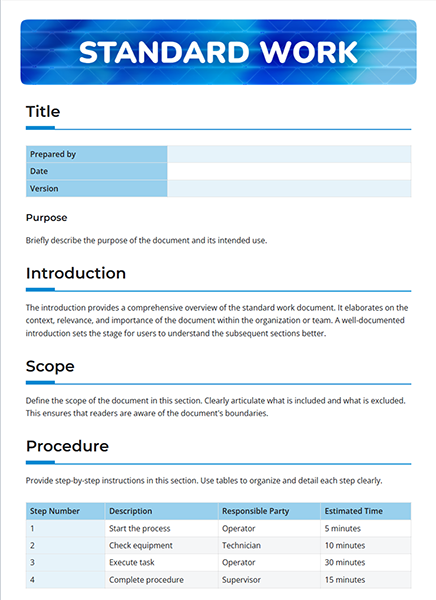
- Document Overview: Includes the document title, purpose, scope, and intended audience.
- Process Details: Defines the process name and identifies the responsible party accountable for execution and maintenance.
- Standard Work Steps: Documents each step of the process, including the step description, responsible party, and required tools or resources.
- Key Performance Indicators (KPIs): Establishes measurable indicators, definitions, target values, and measurement frequency to evaluate process effectiveness.
- Risk Management: Identifies potential process risks, their probability and impact, and the mitigation strategies required to address them.
- Additional Resources: Provides supporting information through appendices, diagrams, attachments, and relevant references.
- Approval & Review: Records approval authority, approver details, approval dates, review schedules, and document revision requirements.
- Comments & Feedback: Provides space for users to record observations, suggestions, or improvement opportunities for future updates.
How to Use This Standard Work Template?
Follow these simple steps to create and customize your standard work document in Bit.ai.
Step 1. Open the standard work template in Bit.ai.
Step 2. Define the process, its purpose, and the people responsible for it.
Step 3. Document the work sequence, instructions, tools, and quality standards.
Step 4. Add safety requirements, common errors, and performance measures.
Step 5. Collaborate and review the document with the team and update it when the process changes.
Who Can Use This Standard Work Template?
- Operations managers
- Process improvement teams
- Quality assurance teams
- Project and team managers
- HR and training teams
- New and frontline employees
- Organizations documenting standard processes
Pro Tips for Creating Effective Standard Work
Follow these standard work best practices to make processes easier to follow and maintain.
- Write instructions in a clear, step-by-step format.
- Include only the information needed to perform the task correctly.
- Define measurable quality standards.
- Use visuals when they help explain a process.
- Review and update standard work documents regularly.
Why Use Bit.ai for Standard Work Documentation?
Bit.ai helps teams create, organize, and collaborate on standard work documents in one centralized workspace. Keep work instructions, process guides, training resources, and supporting documents together while collaborating in real time. With AI-powered writing, smart document organization, and rich media embeds, Bit.ai makes standard work documentation easier to create and maintain.
FAQs
Q1. What is a standard work template?
A Standard Work template is a structured format for documenting the best-known way to perform a task. It helps teams clearly define the steps, key points, timing, and expected results for consistent execution.
Q2. What's the difference between Standard Work and an SOP?
Standard Work defines the best-known way to perform a task consistently and efficiently, while an SOP provides documented instructions for completing a process correctly and safely.
Q3. How do I use this Standard Work template in Bit.ai?
Simply open the template in Bit.ai, add your process details, document the work instructions, define quality standards, and update the document as the process changes.
Q4. Can multiple team members collaborate on a Standard Work template in Bit.ai?
Yes. Bit.ai supports real-time collaboration, allowing team members and process owners to create, review, and update standard work documents together.
Q5. Can I add images and supporting documents to my Standard Work?
Yes. Bit.ai supports rich media embeds, allowing you to include process diagrams, training videos, checklists, spreadsheets, and other supporting resources.
Q6. What sharing options are available for a Standard Work document?
Bit.ai offers multiple sharing options, including live document links, website embeds, trackable links, guest access, and password protection for secure collaboration.