FREE TEMPLATES
Best Risk Assessment Template
Identify potential risks, evaluate their impact, and plan appropriate responses with this free, customizable Risk Assessment Template. Use it to document risks, assess their likelihood and severity, assign owners, and track mitigation actions.


What Is a Risk Assessment Template?
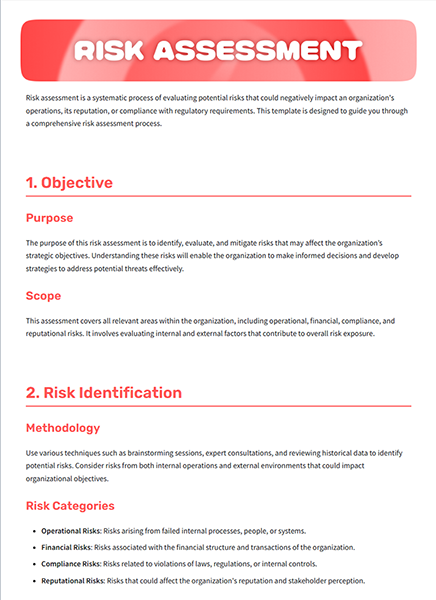
A Risk Assessment Template is a structured document used to identify and evaluate potential risks that could affect a project, process, workplace, or business activity. It helps teams assess the likelihood and impact of each risk and record the actions needed to prevent, reduce, or manage it.
The template brings important risk details into one place, making it easier for teams to understand potential issues, prioritize risks, and track appropriate actions throughout a project or activity.
Why Do You Need a Risk Assessment Template?
A risk assessment helps teams identify potential issues before they affect their work. You can use it to:
- Identify potential risks and hazards
- Prioritize risks that need attention
- Assign responsibility for managing risks
- Document mitigation and response plans
- Track risks throughout a project
- Improve project and operational planning
- Support compliance and safety processes
What Should a Risk Assessment Template Include?
A well-structured risk assessment template should cover the key details needed to identify, evaluate, and manage risks.
Key sections included in this Risk Assessment Template are:
- Assessment Details: Project or task name, date, assessor, reviewer, and version.
- Purpose and Scope: The reason for the assessment and the areas or activities it covers.
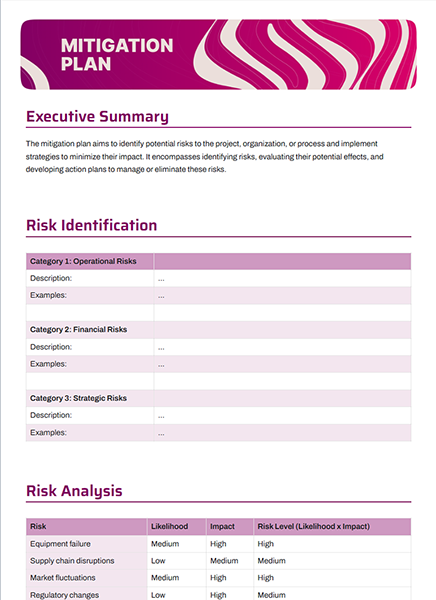
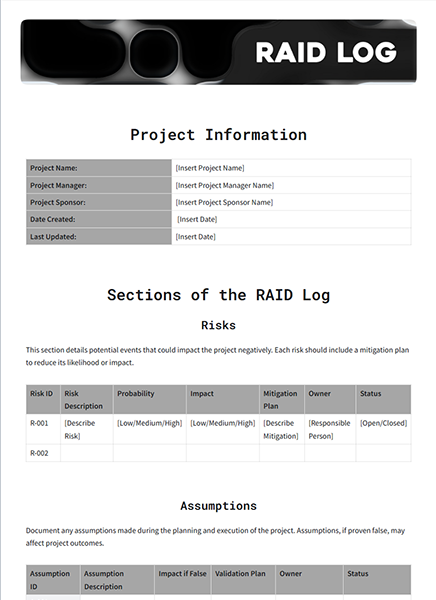
- Risk Identification: Risk ID, description, category, cause, and date identified.
- Risk Analysis: Details of how each identified risk could affect the project, process, or activity.
- Mitigation Actions: Steps planned to prevent, reduce, or manage each risk.
- Action Deadline: Target date for completing mitigation activities.
- Risk Status: Current status of each risk and its related actions.
- Monitoring and Review: Review dates, updates, and notes for tracking changes over time.
- Approvals: Names, roles, and dates for relevant reviewers or approvers.
- Supporting Documents: Additional files, references, or information related to the assessment.
How to Use This Risk Assessment Template?
Follow these simple steps to identify, assess, and manage risks in Bit.ai.
Step 1. Open the Risk Assessment Template in Bit.ai.
Step 2. Add the project or task details, assessment purpose, scope, and people involved.
Step 3. Identify potential risks and record their descriptions, categories, likelihood, and potential impact.
Step 4. Add risk levels, mitigation actions, responsible owners, deadlines, and current status for each risk.
Step 5. Review the completed assessment, update risks as needed, and share it with relevant team members or stakeholders.
Who Can Use This Risk Assessment Template?
- Project managers
- Operations managers
- Risk management teams
- Health and safety teams
- Quality assurance teams
- Business owners
- HR and compliance teams
- Construction and field teams
- Organizations managing operational risks
Pro Tips for an Effective Risk Assessment
Follow these practices to make your risk assessment clear, useful, and easy to review:
- Identify risks based on the project, process, or activity being assessed.
- Describe each risk clearly and explain its potential impact.
- Focus attention on risks that require active management.
- Assign a clear owner to each significant risk.
- Document existing controls before adding new actions.
- Set realistic deadlines for mitigation activities.
- Review the assessment whenever project or process conditions change.
Why Use Bit.ai for Your Risk Assessment?
Bit.ai helps teams create, organize, and collaborate on risk assessments in a shared workspace. Keep risk details, ratings, mitigation actions, responsible owners, supporting information, and review notes organized while working together in real time.
With AI-powered writing, rich media embeds, and flexible sharing options, Bit.ai makes risk assessments easier to create, review, update, and share with relevant teams and stakeholders.
FAQ
Q1. How do I use this Risk Assessment Template?
Simply open the template in Bit.ai, add the assessment details, identify potential risks, evaluate their likelihood and impact, define mitigation actions, assign owners, and review the assessment regularly.
Q2. Can multiple team members collaborate on a Risk Assessment?
Yes. Bit.ai supports real-time collaboration, allowing team members to identify risks, add information, review risk levels, and contribute to mitigation plans in the same document.
Q3. Can I customize this Risk Assessment Template?
Yes. You can add, remove, or edit sections to match your risk categories, assessment criteria, project requirements, and specific use case.
Q4. Can I add supporting documents to the Risk Assessment Template?
Yes. You can add relevant documents, links, images, videos, and other resources to provide additional information about identified risks.
Q5. How can I share this Risk Assessment Template?
You can share the risk assessment using live document links, website embeds, trackable links, guest access, or password-protected links, depending on your sharing needs.