FREE TEMPLATES
Best Podcast Planning Template
Plan podcast episodes, organize ideas, and prepare your production workflow with this free, customizable Podcast Planning Template. Use it to map out episode topics, guest details, key talking points, recording information, promotional content, and publishing tasks in one organized place.


What Is a Podcast Planning Template?
A podcast planning template is a structured document that helps you plan and organize a podcast episode from the initial idea to publication. It brings episode topics, research, guest information, talking points, production notes, and promotional activities into one organized framework.
A consistent planning format helps podcast teams prepare episodes more efficiently, keep important details in one place, and maintain a clear workflow throughout the production process.
Why Do You Need a Podcast Planning Template?
A podcast planning template helps you turn an episode idea into a clear production plan. You can use it to:
- Organize podcast episode ideas
- Plan talking points and questions
- Manage guest information
- Keep research and references organized
- Track recording and editing tasks
- Plan episode titles and descriptions
- Coordinate publishing activities
- Prepare promotional content
What Should a Podcast Planning Template Include?
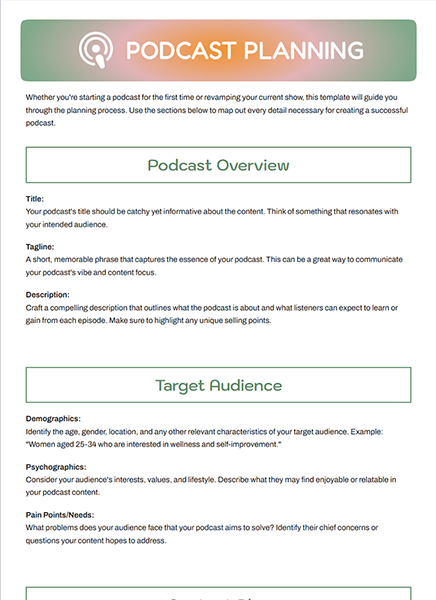
A Podcast Planning Template should organize the key information needed to plan, produce, promote, and evaluate a podcast.
Key sections included in this Podcast Planning Template are:
- Podcast Overview: Defines the podcast title, subtitle, hosts, and overall show description.
- Audience Persona: Identifies the target audience through demographic and psychographic details, including their interests, challenges, and goals.
- Episode Planning: Outlines the publishing schedule, episode frequency, structure, duration, topics, segments, and guest information.
- Technical Considerations: Covers the equipment, recording software, and production tasks required for recording, editing, and mastering episodes.
- Marketing & Promotion: Organizes promotional activities, audience engagement strategies, social media promotion, email newsletters, listener feedback, and potential collaborations.
- Metrics & Evaluation: Tracks key performance indicators such as downloads, listener growth, engagement, and audience feedback to identify opportunities for improvement.
How to Use This Podcast Planning Template?
Follow these simple steps to plan, structure, and organize your podcast in Bit.ai.
Step 1. Open the Podcast Planning Template in Bit.ai.
Step 2. Add your podcast details, including the title, description, hosts, and target audience.
Step 3. Plan your episodes by defining the publishing schedule, episode structure, topics, segments, and guests.
Step 4. Organize the technical requirements, recording and editing tasks, promotional activities, and collaboration details.
Step 5. Review the complete plan, track key performance metrics, gather feedback, and refine your podcast strategy.
Who Can Use This Podcast Planning Template?
- Podcast hosts and creators
- Producers and production teams
- Content and marketing teams
- Interviewers and guest managers
- Freelance podcast producers
- Agencies creating branded podcasts
- Businesses and organizations with podcasts
Pro Tips for Effective Podcast Planning
Follow these practices to make your podcast well-structured, consistent, and easier to produce:
- Define the podcast’s purpose, format, and target audience before planning episodes.
- Choose relevant topics that align with your audience’s interests and expectations.
- Prepare questions without making the conversation feel scripted.
- Keep useful references close to your talking points.
- Allow room for natural conversation.
- Plan promotional content before publishing.
- Review listener feedback and performance metrics to improve future episodes.
Why Use Bit.ai for Your Podcast Planning?
Bit.ai gives podcast teams a collaborative workspace to plan, write, organize, and share episode information. You can keep research, guest details, scripts, links, videos, and other supporting resources together.
Hosts, producers, writers, and marketing teams can collaborate on the same document, add comments, and update episode details in real time. Bit.ai’s AI Writer can also help brainstorm topics, refine questions, draft episode descriptions, and organize notes.
Looking for another way to plan your podcast? Use Bit.ai’s AI Podcast Idea Generator to generate podcast ideas with AI, then customize them to fit your audience.
FAQ
Q1. How do I use this Podcast Planning Template?
Simply open the template in Bit.ai, add your podcast details, define your audience, plan episodes, organize production tasks, and outline your marketing activities.
Q2. Can multiple team members collaborate on a Podcast Planning Template?
Yes. Bit.ai supports real-time collaboration, allowing hosts, producers, writers, editors, and marketing teams to review the plan, add feedback, and make updates together.
Q3. Can I customize this Podcast Planning Template?
Yes. You can add, remove, or edit sections to match your podcast format, production workflow, publishing schedule, and team requirements.
Q4. Can Bit.ai's AI Writer help with podcast planning?
Yes. Bit.ai's AI Writer can help brainstorm episode ideas, create outlines, draft content, rewrite sections, and refine talking points.
Q5. How can I share this Podcast Planning Template?
You can share your podcast plan through live document links, website embeds, trackable links, guest access, or password-protected links, depending on your collaboration and sharing needs.