FREE TEMPLATES
Best Interview Scorecard Template
Evaluate candidates consistently and make better hiring decisions with this free, customizable Interview Scorecard Template. Assess candidates against key skills, qualifications, competencies, interview criteria, and role-specific requirements.


What Is an Interview Scorecard Template?
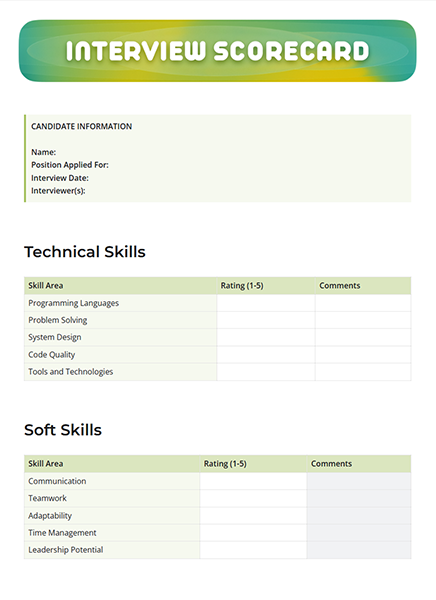
An Interview Scorecard Template is a structured document used to evaluate candidates during the hiring process. It provides interviewers with consistent criteria for evaluating skills, experience, qualifications, competencies, and role fit.
A scorecard helps hiring teams compare candidates objectively, capture structured feedback, and make informed hiring decisions based on documented evaluations.
Why Do You Need an Interview Scorecard Template?
An Interview Scorecard Template helps hiring teams standardize candidate evaluation and create a more objective interview process. You can use it to:
- Define clear interview criteria and evaluation standards
- Assess candidates against consistent hiring criteria
- Compare candidate skills, strengths, and weaknesses
- Support objective, data-informed hiring decisions
- Identify skill gaps and areas for further assessment
- Document structured interview feedback and outcomes
- Keep interviewers aligned throughout the hiring process
What Should an Interview Scorecard Include?
An interview scorecard should cover the key information and evaluation criteria needed to assess candidates consistently and objectively.
Key sections included in this Interview Scorecard Template are:
- Candidate Information: Records the candidate’s name, position, interview date, and interviewer.
- Technical Skills: Rates role-specific skills, tools, technologies, and technical knowledge.
- Problem-Solving Skills: Evaluates analytical thinking, creativity, and decision-making abilities.
- Communication Skills: Assesses verbal communication, written communication, and active listening.
- Team & Values Alignment: Evaluates alignment with team values, collaboration, adaptability, and role expectations.
- Overall Impression: Summarizes the candidate’s key strengths, concerns, and overall interview performance.
- Hiring Recommendation: Records the interviewer’s recommendation and the reasoning behind it.
- Comments & Feedback: Captures additional observations and feedback relevant to the hiring decision.
How to Use This Interview Scorecard Template?
Follow these simple steps to create and customize your interview scorecard in Bit.ai.
Step 1. Open the interview scorecard template in Bit.ai.
Step 2. Add the candidate’s details, position, interview date, and interviewer information.
Step 3. Define the evaluation criteria and rate the candidate’s skills, competencies, qualifications, and role-specific capabilities.
Step 4. Record interview feedback, strengths, concerns, and overall observations.
Step 5. Collaborate with the hiring team, review feedback, and document the final hiring recommendation.
Who Can Use This Interview Scorecard Template?
- Recruiters and HR teams
- Hiring managers
- Interview panels
- Department managers
- Talent acquisition teams
- Business owners
- Organizations hiring employees
Pro Tips for Using an Effective Interview Scorecard
Follow these practices to make candidate evaluation more consistent and support better hiring decisions:
- Define evaluation criteria before interviews begin.
- Use the same core criteria for every candidate applying for the role.
- Keep ratings clear and consistent.
- Support ratings with specific interview observations and examples.
- Separate required skills from preferred qualifications.
- Complete scorecards soon after each interview.
- Review feedback before making the final hiring decision.
Why Use Bit.ai for Your Interview Scorecard?
Bit.ai helps hiring teams create, organize, and collaborate on interview scorecards in one centralized workspace. Keep candidate details, evaluation criteria, ratings, interview feedback, and hiring recommendations together while working with interviewers in real time.
With AI-powered writing, smart document organization, and rich media embeds, Bit.ai makes interview scorecards easier to create, review, share, and update throughout the hiring process.
FAQ
Q1. What is the difference between an interview scorecard and an interview evaluation form?
An interview scorecard uses predefined criteria and rating scales to evaluate candidates consistently, while an interview evaluation form typically focuses on recording broader feedback, observations, and overall impressions.
Q2. How do I use this Interview Scorecard Template in Bit.ai?
Simply open the template in Bit.ai, add candidate details, define evaluation criteria, rate relevant skills, record interview feedback, and collaborate with the hiring team to make an informed hiring decision.
Q3. Can multiple interviewers collaborate on an Interview Scorecard in Bit.ai?
Yes. Bit.ai supports real-time collaboration, allowing interviewers to review candidate assessments, add feedback, discuss evaluations, and stay aligned throughout the hiring process.
Q4. Can we add supporting resources to this Interview Scorecard?
Yes. Bit.ai supports rich media and content embeds, allowing you to add documents, spreadsheets, videos, links, images, and other resources relevant to the candidate evaluation process.
Q5. What sharing options are available for an Interview Scorecard?
Bit.ai offers multiple sharing options, including live document links, website embeds, trackable links, guest access, and password protection, making it easy to share interview scorecards securely with hiring stakeholders.