FREE TEMPLATES
Best Daily Work Log Template
Track daily tasks, work progress, completed activities, and pending responsibilities with this free, customizable Daily Work Log Template. Use it to maintain a clear record of your workday, track productivity, and keep managers and team members informed about work progress.


What Is a Daily Work Log Template?
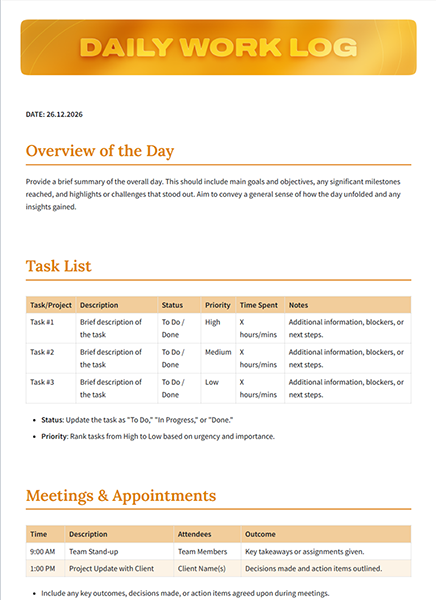
A Daily Work Log Template is a structured document used to systematically record tasks, activities, work hours, and progress throughout each workday. It provides a consistent way to document completed and outstanding work, track challenges, and capture important notes.
By maintaining a daily work log, teams can improve visibility into workload and productivity, identify delays or recurring issues, and support better planning and performance reviews.
Why Do You Need a Daily Work Log Template?
A daily work log helps teams maintain accurate work records and understand how time is being spent. It can be used to:
- Track daily tasks and completed work
- Record working hours and time spent on activities
- Monitor project and task progress
- Identify delays, challenges, and blockers
- Document important updates and decisions
- Improve accountability and productivity tracking
- Support daily and weekly reporting
- Plan unfinished tasks for the next workday
What Should a Daily Work Log Include?
A well-structured daily work log typically includes the following key sections:
- Day Overview - Records the date, working hours, total hours worked, and a brief view of the day's activities.
- Key Goals and Objectives - Lists the main priorities for the day, along with their priority level, to keep work focused and measurable.
- Scheduled Tasks and Meetings - Tracks planned activities, meetings, time slots, location or platform, and completion status.
- Accomplishments - Documents completed tasks and the outcomes or results achieved during the day.
- Challenges and Solutions - Records roadblocks, issues, and the actions taken to resolve them or keep work progressing.
- Insights and Reflections - Captures key learnings, observations, and opportunities for improving productivity or work practices.
- Tasks for Tomorrow - Carries forward outstanding work and identifies the next day's priorities to support planning and continuity.
How to Use This Daily Work Log Template?
Follow these simple steps to record and manage your daily work in Bit.ai.
Step 1. Open the Daily Work Log template in Bit.ai.
Step 2. Enter the date, employee details, and working hours.
Step 3. Record the tasks and activities completed throughout the day.
Step 4. Note your progress, challenges, pending tasks, and important updates.
Step 5. Review the log at the end of the day and record any follow-up actions for the next working day.
Who Can Use This Daily Work Log Template?
- Employees and freelancers
- Project and team managers
- Remote and hybrid teams
- Operations and administrative teams
- Field workers and consultants
- HR and reporting teams
- Organizations tracking daily work activities
Pro Tips for Maintaining an Effective Daily Work Log
Follow these simple tips to keep your daily work log accurate, consistent, and useful.
- Update the log throughout the day instead of relying on memory.
- Keep task descriptions clear and specific.
- Record the actual time spent on important activities.
- Mention blockers as soon as they affect your progress.
- Review pending tasks before starting the next workday.
- Keep logs organized for easy reporting and future reference.
Why Use Bit.ai for Your Daily Work Log?
Bit.ai helps teams create, organize, and share daily work logs in one collaborative workspace. You can customize the template, add tables and checklists, and include supporting documents or rich media when needed.
Teams can collaborate in real time, while managers can quickly review updates, monitor progress, and stay informed about ongoing work, all from one place. Bit.ai’s AI Writer can also help draft task descriptions, summarize daily activities, and refine work updates for greater clarity and consistency.
FAQ
Q1. How do I use this Daily Work Log Template in Bit.ai?
Open the template in Bit.ai, add your work details, record daily activities, and customize the sections based on your team’s needs.
Q2. Can multiple team members collaborate on the daily work log?
Yes. Bit.ai allows multiple team members to collaborate on shared documents and update work information in one place.
Q3. Can I add supporting documents to the work log?
Yes. You can add files, images, videos, links, and other supporting resources to provide more context.
Q4. How can I share a daily work log?
Bit.ai offers multiple sharing options, including live document links, website embeds, trackable links, guest access, and password protection, making it easy to securely share daily work logs with teams, managers, and external stakeholders.
Q5. Can Bit.ai’s AI Writer help create daily work logs?
Yes, Bit.ai’s AI Writer can help you create and refine daily work logs by drafting task descriptions, summarizing completed work, translating content, and improving progress updates.